[I started this post almost a month ago, on the 19th of February, and realized today, amidst all the iPad 3 brouhaha, that I’d never finished it.]
So I haven’t had a choice to talk about my new toy yet …
(And in doing so, it’s not about bragging rights, more for future reference when I look back in 15 years and say, “Wow, remember when we carried a phone around outside of our body?”)
I’ve enjoyed the HTC Incredible phone I got a few years back. It’s served me quite well, both as an inititation into the smartphone world (Android) and as a basic tool in my life.
Still, it was showing its age after a couple of years. Some chips. Some dings. Some memory constraints. Most annoyingly, the ear piece had stopped working, so every call had to be done as a speaker call. So in exercising my upgrade option with Verizon, I wasn’t (just) looking for a new piece of techbling; I had a legitimate reason to replace the phone. That’s my story, and I’m sticking to it.
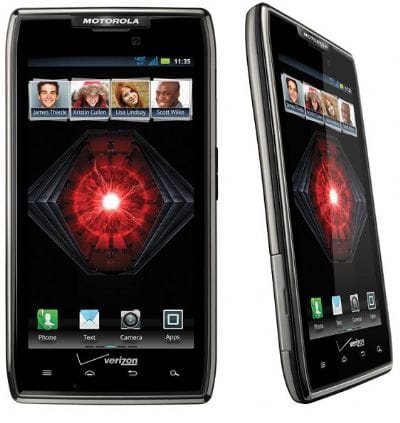 The phone I decided on is one of the current leads in Verizon’s stable, the Motorola Droid RAZR MAXX. An unfortunate name, to be sure. Margie had replaced her HTC Incredible with a Motorola Droid X2 back in December, and has been enjoying it quite a bit, so once I’d finished eyeing and rejecting the Samsung Galaxy Nexus, I was more than happy to look over the Moto line. (Yes, there are some fine HTC phones out there, but I kind of wanted something new in the interface, too.)
The Razr Maxx (which only sounds half as ridiculous when it’s not in ALL CAPS) is a new version of Moto’s Razr, itself a very respectable phone. The main draw to it is the battery, which everyone has been oohing and aahing about as the Second Coming because (egads!) you can be using the phone all day and not worry about it running out of juice.
Battery life is a huge thing in smartphones, something I’d had no idea coming off of dumbphones and Blackberries. I’m used now to simply plugging in my phone whenever I’m at home or work, but yesterday (my first full day with the new phone) I was using it off and on all day and by last evening it was still at a 60% charge. Outstanding. [Update: This remains an amazing feature. E.g., yesterday I had the phone all day with moderate use, then forgot to plug it in last night. This morning it still had plenty of power to use on the commute in. Amazing, for a smartphone.]
The phone is one of the new 4G/LTE band phones, and I agree that it’s pretty damned fast with the downloads. I’m not a watch-a-movie-on-my-phone kind of guy, but simple web page access is much speedier. I seemed to have 4G pretty much all day yesterday, so that’s certainly a good thing. [Update: The 4G speed is certainly nice. While the phone occasionally has problems dropping down to 3G if 4G is not available, for the most part it works quite nicely. Coverage for 4G in downtown Denver is pretty good.]
I dropped my Incredible into containers of water on a couple of occasions, and was always (a miracle!) able to open it up and dry it out. The Razr Maxx is sealed — no removable battery — but designed to be water resistant. I hope I don’t have to test that.
As added protection (and to make it fit better on my belt case), I have picked up a silicone sheath for it. That’s also necessary because the part number and serial number stickers are stuck on the back of the phone (since they can’t go inside, which is sealed), and would have not lasted long otherwise.
I mentioned above the different interfaces. On top of the Android OS, HTC adds its “Sense” user interface, while Motorola adds its “Motoblur” interface. The two are fairly similar, and most of the differences are cosmetic (e.g., in the apps list on Sense, you scroll up and down; on Motoblur you scroll left and right). The Moto interface seems to overcome a few of the inconveniences of Sense (e.g., ease of dragging icons between the various screens), but it remains pretty much a wash to me.
How do the two phones compare spec-wise? (Please forgive the not-always-consistent cutting and pasting from a few sources.)
| Category | HTC Incredible | Moto Razr Maxx |
| CPU | Qualcomm® QSD8650, 1GHz Snapdragon™ | 1.2 GHz TI OMAP4430 dual-core – faster, though not perceptibly by all much. I don’t do a lot of computationally-intensive functions. |
| Memory | Flash 8GB + 512MB/RAM 512MB | 16 GB internal storage, raw hardware 11 GB internal storage, available to user plus 16 GB card included 1 GB RAM – much more memory. This is a Good Thing. |
| Dimensions (LxWxT) | 4.63 x 2.30 x 0.47 inches (117.5 x 58.5 x 11.9 mm) | 5.15 x 2.71 x 0.35 (130.7 x 68.9 x 8.99 mm ) – wider, taller, thinner |
| Weight | 4.6 ounces (130 grams) with battery | 5.11 oz (145 g) – slightly heavier |
| Display | 3.7-inch with 480 X 800 WVGA resolution | 4.3″ with 540 x 960 resolution. – bigger! |
| Expansion Slot | microSD™ memory card (SD 2.0 compatible) Up to 32 GB card support. No pre-installed card. | microSD (TransFlash) 16 GB card included – nice that the expansion card is included. |
| Camera | 8-megapixel color camera with auto focus and flash | 8+ megapixel with auto-focus, LED flash / scene modes, night mode, macro mode, panorama, multi-shot, timer, exposure control Also 1.3 megapixel front-facing camera – more camera! Though I don’t expect to use the front-facing much, if at all. |
| Battery | LiIon, Capacity: 1300 mAh Talk time: Up to 313 minutes Standby time: Up to 146 hours | LiIon, Capacity 3300 mAh Talk: 21.5 hours max. (1290 minutes) Standby: 380 hours max. (15.8 days) – much, much more battery, huzzah! |
So, overall, a pretty nice upgrade.
From a phone perspective (yes, I know, how droll, using a smartphone as a phone), I would say the sound quality is significantly better and the reception at my house significantly better as well. Which is more than just pretty nice, for work use.
Two other features / items worth noting:
- There’s been a lot of chat about the Razr Maxx’s “Smart Actions” app, which supposedly lets you do all sorts of cool things automatically when certain conditions apply (e.g., “When I am at this local movie theater, automatically change the phone to vibrate” or “At night, if the phone is not plugged in, reduce some of the power consuming features.”). I’ve played with this a little, but haven’t found anything that seems all that spectacular.
- On the Incredible, the power socket was on the left hand side, toward the bottom, and the power button was on the top. With the Razr Maxx, the power socket is on the top, the power button is on the right hand side, toward the top. I actually find that configuration easier to use.
The only think the Razr Maxx doesn’t have is the latest Android OS, “Ice Cream Sandwich.” It is, rumor has it, coming out Real Soon Now (only one handset does have it so far, the Samsung I didn’t care for).
[Update: So, a month later, how do I like it? Absolutely no regrets so far. Glad I have it, and I expect to have it for a long time. Like … probably at least another couple of years …]
What about volume button placement? On my T-Mobile MyTouch (also a dumb name, but I can’t deliberately mock it with a silly pronunciation as I can with the Razzer Maxix), my thumb frequently inadvertently presses the volume button, turning it way down.
Also, the maximum volume is not loud enough to hear audio/video files without a headset/earphone.
@Avo, the volume rocker on the Razzer Maxix is on the right side, slightly below the power button. I seem to hit it less often than I did on the Incredible, but not sure why.
I don’t listen to A/V files on my phone, so I can’t speak to that experience.