https://buy-zithromax.online buy kamagra usa https://antibiotics.top buy stromectol online https://deutschland-doxycycline.com https://ivermectin-apotheke.com kaufen cialis https://2-pharmaceuticals.com buy antibiotics online Online Pharmacy vermectin apotheke buy stromectol europe buy zithromax online https://kaufen-cialis.com levitra usa https://stromectol-apotheke.com buy doxycycline online https://buy-ivermectin.online https://stromectol-europe.com stromectol apotheke https://buyamoxil24x7.online deutschland doxycycline https://buy-stromectol.online https://doxycycline365.online https://levitra-usa.com buy ivermectin online buy amoxil online https://buykamagrausa.net

IM mania

I have really gotten tired of MSN Messenger. Like, really tired. See, to me, an IM client should let you, oh, send messages back and forth. It should let you…

I have really gotten tired of MSN Messenger. Like, really tired.

See, to me, an IM client should let you, oh, send messages back and forth. It should let you see if someone is online. That’s — oh, about 99% of what I want.

MSN seems to think that its IM client should also be your browser portal, your place to shop, your access to eBay, a place to advertise, a location to tell what kind of music you’re listening to, etc.

As a result, it is the ugliest, most cluttered IM client I currently have. So I’m shutting it down. Instead, I’ll let the older Windows Messaging client handle both in- and out-of-office Microsoft messaging. I lose the little news blurbs, but that’s about it, and I can so live with that.

Yahoo! IM is a decent IM client, too. It can be just as crufty as MSN Messenger, but it has very straightforward options for turning all that crap off. I actually prefer it to Windows Messenger, and for a shiny nickel I’d get rid of all my MS IM accounts and encourage folks to just use YIM.

Or, of course, to use Google Talk, which I like best. Fast, simple, clean, easy.

Seriously considering getting both sets of ‘rents set up with YIM or Google Talk over the holidays. That would be a real step forward.

Pay me now, or pay me later

The advantage of monitoring one’s work e-mail from home is that there is a smaller bundle of goodies to go through first thing Monday. God willing. I’ve actually been trying…

The advantage of monitoring one’s work e-mail from home is that there is a smaller bundle of goodies to go through first thing Monday.

God willing.

I’ve actually been trying an alternative for monitoring office mail. There are four options I’ve found, though I’ve only used the first three before:

  • Outlook Native: VPN into the company and fire off Outlook.
    Pro: Full-blown mail functionality and response.
    Con: VPN connection is subject to glitches and has maximum-length timer. Outlook is a resource hog. VPN connection blocks me from my local network (for printing), not to mention CoH.

  • Outlook Web Access: Micro$oft’s web viewer for Outlook, visible for our company across the Web.
    Pro: Just a browser window (albeit IE). Calendar access, etc.
    Con: Doesn’t update folder mail counts well, requiring intervention to make sure I’m seeing everything. Kludgy web interface. Slow to use, very difficult (slow) to view history.

  • Forward key mail to home: Set up a rule to forward mail from my boss to my home account.
    Pro: Minimum intervention on my part. Catches things that I at least need to pay a little attention to. Home e-mail (Thunderbird) is always up.
    Con: Misses anything not following the rules. Most follow-ups require going into Options 1 or 2.

  • IMAP via Thunderbird: Use Thunderbird to access our IMAP mail server. Subscribe to the key folders I need to track.
    Pro: Thunderbird is always up. Solid mail client power. All key e-mail received.
    Con: Possibly miss stuff that routes to non-subscribed folders; have to update subscriptions if I modify my mail setup. IMAP folder subscriptions do not automatically update, as far as I can tell, requiring manual intervention (click on folder), which is annoying.

That last bit in #4 was part of what was bugging me this weekend. Otherwise, it worked perfect, and I was able to track some office problems near-normally with just my normal home e-mail client. Supposedly Thunderbird should do that, though, so I need to figure out where the problem is.

Premonitions of my Christmas Vacation

Tech support and the Land of Faerie … (via Randy)…

Tech support and the Land of Faerie

(via Randy)

Firefox extensions

Doing the upgrade to Firefox 1.5 the other day reminded me it’s been a while since I did a list of my current extensions. I’ve been trying to pare the…

Doing the upgrade to Firefox 1.5 the other day reminded me it’s been a while since I did a list of my current extensions. I’ve been trying to pare the list down, only including the ones that I actually use. Here are my current recommendations, all of which work in 1.5 (in no particular order except how they show up in the Extensions dialog):

MUST HAVES

  • AI Roboform: An excellent password manager, form filler, etc. Works interchangeably between FF and IE, which is a plus. FF requires an added extension to have it show up in the tool bar. This thing makes my life so much easier, I cannot begin to tell you. The basic version is free, but has limits on the number of passcards (10, I think) it supports; the pay version is $30, with added versions for Palm, WinCE, USB flash drive, etc.

  • Adblock: Automatically block image files (and iFrames) that you identify, including by wildcard. Great for viewing much cleaner and less-ad-ridden pages.

  • Flashblock: Flash is the new Animated GIF as far as ads go. This extension prevents Flash images from displaying until you click on them. Again, much cleaner pages.

  • Tab Mix Plus: Takes the already-spiffy tabbed browsing that FF has and makes it even more flexible and powerful. I first got into tabbed browsing with SlimBrowser, and this lets me model things like it if I choose. Has some nice extra features, too, like remembering the tabs open in your last session (which, for a tab-a-holic like me, is critical).

  • Resizeable Textarea: Allows you to drag open a web form textarea (e.g., the comments area on my blog, compose windows in Gmail, bulletin board entry areas) to whatever size will fit the screen. Awesomely useful, as confirmed if you Google it. Alas, this extension has not been updated for 1.5 as of yet. I keep watching.

  • IE View: Lets you open a link or the current page in IE (for those annoying pages that require it, or for testing pages in both FF and IE). Can also be set, now, to automatically load a particular page or domain in IE.

  • Text size toolbar: Adds text size (bigger, smaller, original) buttons to the toolbar. Probably the least necessary of extensions I use (esp. for those who have a wheel mouse), but I like having it.

  • SpellBound: Spell-checker for form fields. Very nice. Probably ought to be standard browser functionality.

  • Print It! – Adds a Print and Print Preview to the (right-click) context menu. This should really be standard in FF, in my opinion. Unfortunately, the souce site seems to have gone bye-bye. I may still have a copy on disk, if anyone’s dying for it …

  • Print Image: Right-click and image and send it directly to the printer. Again, an essential, found also in IE, that should be standard.

NICE TO HAVES

  • Forecastfox: Puts a highly configurable Accuweather forecast in the status bar. Handy to glance ahead at the weather. Provides popup alerts, too.

  • BugMeNot: A database (continuously updated) of dummy userid/passwords for annoying and pointless registration pages at sites (e.g., news sites).

  • ChromEdit: Easy way to update and view the “chrome” config files behind Firefox. Not yet updated for 1.5.

  • Add Bookmark Here: Adds the option to bookmark a page while in the bookmarks menu. Convenient.

  • ImgTag: Right-click an image in your browser and generate in the clipboard an XHTML IMG tag for it. While it’s not alway kosher to crosslink to images hosted elsewhere, there are still plenty of legit uses for this.

  • FireFTP: A web-based FTP client. Seriously unfancy, but better than nothing.

  • Google Pagerank: I like the standardsearch functionality in FF, so I don’t have a strong need for the Google Toolbar. That said, it’s kind of fun to see what a Pagerank is for a given page is. This displays it in the status bar.

  • DownTHEMall!: Easy downloading of images (or other types of files) from a site with a single click. Convenient.

  • Resize Search Bar: The default search bar in FF is of a fixed width — and too narrow. This lets you expand it. Nice.

  • Bookmarks Synchronizer: Automatically upload changes to bookmarks up to your own FTP site.

Firefox 1.5

The new release of Firefox has arrived. Not sure when I’ll upgrade (I’m both eager to play and reluctant to deal with the inevitable hiccups, despite the lengthy beta process),…

The new release of Firefox has arrived. Not sure when I’ll upgrade (I’m both eager to play and reluctant to deal with the inevitable hiccups, despite the lengthy beta process), but it’s good to know it’s there.

Actually, upon consideration, I’ll probably upgrade sooner than later, so that I can then up grade Margie’s old machine before migrating FF to her new machine, thus minimizing later upgrades.

But … maybe I’ll wait a day or two.

Significant new features in 1.5:

* Automated update to streamline product upgrades. Notification of an update is more prominent, and updates to Firefox may now be half a megabyte or smaller. Updating extensions has also improved. [That’s good. The FF update stuff, while nicer than IE’s, has sometimes been a bit flaky and not available with a lot of extensions.]
* Faster browser navigation with improvements to back and forward button performance. [Yay. Performance has been fine, but faster is usually better.]
* Drag and drop reordering for browser tabs. [So I can turn off that extension feature.]
* Improvements to popup blocking. [Always welcome. Also, I can now install the most recent Flashblocker, which will update much more cleanly, I’m told, in 1.5]
* Clear Private Data feature provides an easy way to quickly remove personal data through a menu item or keyboard shortcut. [Nice.]
* Answers.com is added to the search engine list. [The integrated search engine stuff in FF rocks. Beats Google bar because, well, I can do it with Google, or with Amazon, or with Dictionary.com, or with anything else that someone’s defined. Excellent feature.]
* Improvements to product usability including descriptive error pages, redesigned options menu, RSS discovery, and “Safe Mode” experience.
* Better accessibility including support for DHTML accessibility and assistive technologies such as the Window-Eyes 5.5 beta screen reader for Microsoft Windows. Screen readers read aloud all available information in applications and documents or show the information on a Braille display, enabling blind and visually impaired users to use equivalent software functionality as their sighted peers.
* Report a broken Web site wizard to report Web sites that are not working in Firefox. [This will be interesting.]
* Better support for Mac OS X (10.2 and greater) including profile migration from Safari and Mac Internet Explorer.
* New support for Web Standards including SVG, CSS 2 and CSS 3, and JavaScript 1.6. [Yay. I like that FF supports new standards, rather than, Micro$oft style, extending/modifying new standards.]
* Many security enhancements. [Yay.]

I’ll keep my ears open for problems I hear about.

Treo Central

With a couple of months of the Treo 650 under my belt, I’m beginning to fill in a few feature gaps. One package I’m currently trying a trial for is…

With a couple of months of the Treo 650 under my belt, I’m beginning to fill in a few feature gaps.

One package I’m currently trying a trial for is Central by Bluefish Wireless. Among the features that look particularly of interest to me:

  1. Being able to turn elements of the alarms (sound, vibration, LED) off during predefined intervals. Like, “Don’t ring my phone while in church.” Or, “DND until 5 a.m. on the weekdays, but 9 a.m. on Saturday and Sunday.” Also being able to manually turn this stuff off. Very useful, and something I had as an add-on with earlier Palms.

    There is also an alarm function in Central that will override the DND settings, which is also nice. You can also set up the phone to turn off and on itself (vs. just having the sound and vibrator and LED turn on/off) at set intervals.

  2. Turn the phone back on after a reset. This is a recurring problem with Treos — if the phone reboots, the phone radio doesn’t always come back up, which is a problem. (There are eleventy-dozen utilities out there, including free ones, to do this.)

  3. Send a follow-up “bug me” beep/alarm when voice mail, missed calls, etc. are sitting out there. Again, this is a standard feature I’m used to in other cell phones. If I miss a call, for some reason, I may not see it if I don’t turn the phone on and see the visual reminder.

There are a lot of other little goodies that Central has, including the ability send an SMS “poison pill” code to delete all data on the phone — useful if you have confidential business data in there and your phone is lost or stolen. (The data can be restored by resyncing from your PC.) But the three above are the biggest

I’ll report back on how it works out.

Computers a-plenty!

Finally got off my chassis and worked to get our computer backlog installed. A month or two ago, we bought a new “house” notebook — immediately to give a machine…

Finally got off my chassis and worked to get our computer backlog installed.

A month or two ago, we bought a new “house” notebook — immediately to give a machine to Katherine (to replace the 5/120 that was unable to run any newer games she got), and also to provide us with a non-work laptop to do things with. We finally unboxed it, registered it, got it hooked to the network, and set it up for Kitten to use.

She was, initially, reluctant to give up her own computer. Until she actually started using it, at which time she spent the rest of the weekend doing so, finding that her games loaded with blazing speed and the screen was large and bright and so on and so forth.

No TV. Just computer games. Fun.

Meanwhile, I was working on the machine I’d picked up for Margie. For a variety of reasons, I ended up with a Compaq Presario SR1475CL, a very nice deal via Costco’s “refurb” shop. It had the advantage of being inexpensive and of having an AGP slot that I could drop Margie’s existing graphics card into.

Getting it set up was a bit more lengthy of a process, esp. since the first step was burning system replacement CDs (could have been DVDs, but we had no blanks around the house). Ten disc later, I was actually ready to work on it.

Actually, didn’t do all that much work (various curses and grunts and scowls and grumps notwithstanding), but we got City of Heroes loaded on it, and then I got it hooked up to the keyboard, etc. via the KVM switch over at Margie’s desk.

Margie was ecstatic over the performance — between 1.5Gb of RAM and a 802.11g WiFi NIC, plus her video card, CoH was running like a champ. No more 3-5 minute zones, and much less rubber-banding and jerkiness. I think I scored major brownie points just for that.

Still have to do serious migration from the old Vaio to the new Compaq (applications, browser, e-mail). In the meantime, the Vaio is also hooked to the KVM switch, so Margie can toggle back and forth between them, using her wireless keyboard and monitor for both, as well as her …

Oh, yeah, the Compaq came with a very nice 17″ flatscreen monitor with integrated speakers. So she also has much better (or, at least, larger) graphics, plus two fewer things (speakers) to clutter her desktop.

All in all, a job pretty well done — or, at least, well-started.

The Weekend Ahead

Ah, for a relaxing weekend … FRIDAY Assuming I get out of here in a timely fashion today (not a safe bet these days), my number one job at home…

Ah, for a relaxing weekend …

FRIDAY

  • Assuming I get out of here in a timely fashion today (not a safe bet these days), my number one job at home is sorting out some of the fallen branches around the house. A guy named “Ox” (not kidding, though he’s not what I would describe as Ox-like) is going to be by in about a week to haul it off, but in the meantime I want to get it off the plants and fences.

    Fortunately, the Old Tree Trunk neighbors are picking up the bill for that tree’s branches that are all over our driveway. In the back, I could imagine dunning the neighbors for the remains of their trees, but it’s not worth it.

  • Also on today’s hit parade, cleaning the house. Oh, boy!

  • Computer-related stuff (see below).

  • Tonight is a big dinner/dance/silent auction fundraiser for our church, same deal as the last time. Should be fun. We have up for auction the same three things we did last time — a couple hundred dollars of wine, a “five dinners for a family of four, delivered pre-made and ready to be heated” deal, and a “gourmet multi-course dinner served in your home for up to 6, wine included” deal. The latter was so well received last time that they’re going to do it as a live auction, which should be fun.

    Now all we have to do is get a sitter. Margie made several phone calls earlier in the week, but nothing doing. Rrg.

SATURDAY

  • Another function Saturday night, another sitter we’ve yet to obtain. Rrg. “Hungry Flock” progressive dinner thang, again for the church. Should be fun, as usual, but …

SUNDAY

  • Assuming anyone can make it, it’s our official Game Day at the house. The second of the several that have come and gone that we can actually do. Yeesh. But, hence, the cleaning up on Friday, since the place is a mess.

Also on the docket for this weekend — finally got a replacement PC for Margie, who’s been struggling along with her old one. It’s a refurbed Compaq Presario SR1475CL, via CostCo. Should be adequate for 2-3 years (the main restriction on Margie’s PC — RAM limit of 512Mb). Arrived in the mail yesterday. Amongst that things that need doing:

  1. Identifying the applications that need installing.
  2. Backing up configurations.
  3. Backing up data.
  4. Installing applications over on the new machine.
  5. Restoring data to the new machine.
  6. Moving the graphics card from the old machine to the new machine.
  7. Upgrade the RAM on the new computer from 512Mb to 1Gb (or more, depending on my whims).
  8. Reloading City of Heroes (and CoV/test server stuff).
  9. Endless tweaking.

Not sure how much of that will be done this weekend. I can use my external HD for the backup purposes — but I need to do some cleaning of it (it’s got stuff from several laptop backups on it, and some of it is stuff that’s no longer on my current machine).

I think “sleep” shows up on the list somewhere here. Oh, and “relax,” too. We’ll have to see about that.

After a hellaciously crazy week …

… comes another hellaciously crazy week. Work stuff keeps coming fast and furious, with replanning of older projects that have slipped going alongside new projects hurtling toward us like orbital…

… comes another hellaciously crazy week.

Work stuff keeps coming fast and furious, with replanning of older projects that have slipped going alongside new projects hurtling toward us like orbital kinetic weaponry.

On the home front — I’m beginning to remember why I ended my theatrical career in college (or, perhaps, why my girlfriend insisted I do so), as the Cotton Patch Gospel takes up my non-working waking hours as if I had entered a monastery. Line running and rehearsals every night this week, culminating (praise Allah!) with the actual performances on Friday and Saturday night (7 p.m.), not to mention Sunday afternoon (3 p.m.). Y’all come now, hear?

(We did a demo of one of the songs at the announcements at church at two of the services, and it was extremely well received — which was gratifying, to be sure.)

I still have a tremendous amount of work to do memorizing stuff. Rrg.

Margie, btw, is being very supportive of both endeavors (work and “play”). Many kudos to her. She even understands my need to stay up late (but not too late) playing CoH when I get home at night.

The only weekend activity not otherwise documented was going computer shopping for Margie. Between the 512Mb limit, and some unhealthy fan sounds, and general slowness and congestion, her old Vaio is reaching the end of its useful life in our household.

Biggest annoyance here (aside from contemplating the eventual transfer of data and reinstallation of programs) is that the nice new graphics card we got for her PC will almost certainly not transfer over. That’s because it’s an AGP-slot card, and the industry is shifting to PCIe, and you can’t find new machines with AGP slots.

Rrg.

Poking around here and there, I think it most likely we’ll go for an eMachine and buy a PCIe nVidia card for her. At Jackie’s suggestion, we looked at Dell, but, frankly, the price comparison isn’t there. I don’t need any fancy bells and whistles, and the eMachine I was looking at will do the trick just fine. Total price should be around $800.

Plus, of course, actually figuring out the time to get the frelling thing installed.

And so it goes.

I wonder

Why, sometimes, a particular Microsoft Word window gets reset so that the scroll wheel on the mouse scrolls things left-right vs up-down. Rrg….

Why, sometimes, a particular Microsoft Word window gets reset so that the scroll wheel on the mouse scrolls things left-right vs up-down.

Rrg.

Thunderbird is … go. Soon.

While most of the attention has been on the 1.5 version of Firefox going beta, there’s also a Thunderbird 1.5 beta out. Built-in spell-check, automated software update, integrated server-side spam…

While most of the attention has been on the 1.5 version of Firefox going beta, there’s also a Thunderbird 1.5 beta out. Built-in spell-check, automated software update, integrated server-side spam filtering, and improved UI.

I just hope that it does spam-checking during download, rather than the current method, which waits until you open a folder to do spam-checking on it.

Won’t be downloading the beta, but waiting for the release.

Tech support

Dave provides recommendations to his folks for digital cameras and printers.this post enabled by airblogging.com….

Dave provides recommendations to his folks for digital cameras and printers.

this post enabled by airblogging.com.

Let’s get Started

Les asks, “What’s on your Windows Start Menu?” (Assuming, of course, one has Windows …) Microsoft Office Project – This one I use all the time — though usually it,…

Les asks, “What’s on your Windows Start Menu?” (Assuming, of course, one has Windows …)

  • Microsoft Office Project – This one I use all the time — though usually it, too, gets started via double-clicking on an MPP file.
  • Calculator – Ah! This one I actually use from the Start menu. Because I do, sometimes, need to add up numbers.
  • Microsoft Photo Editor – A very nice, light, fast photo editor. So, of course, M$ doesn’t distribute it with Office any more.
  • Jasc Paint Shop Pro 8 – A very nice, heavy, slow photo editor. I use this for processing most of my photos.
  • Splash ID Desktop – Windows version of my Secret Password / Number / PIN / Rx / SSN / Credit Card storage database.
  • iPassConnect – VPN portal for the company.
  • palmOne Quick Install – File installer for my Palm/Treo.
  • NetMeeting – Desktop sharing for Windows.

Now, the fact is, the Start Menu is not where the action is on my machine. That would be the Quick Launch bar:

  • Show Desktop – a/k/a Hide Everything Quick.
  • Windows Explorer
  • PSA Cards – My phone book
  • IE – I don’t use it, but techs who come to work on my machine do, and I’d rather they find it here than go rooting around my Start menu for it …
  • Microsoft Outlook – Office e-mail, schedule, to-do list.
  • Microsoft Word – Word processing
  • Microsoft Excel – Duh …
  • SmartMT – Blog client.
  • Firefox – The browser I actually use.
  • BalanceLog – Key to the Geek Diet, where I enter in my calories.
  • Thunderbird – E-mail is Go!
  • Shortcut to our electronic timesheet system.
  • Shortcut to my WIST quotations database in Access
  • iTunes – My music player.
  • EditPad Light – My text editor.

By the way, like Randy, I keep my Taskbar on the left side of my screen, rather than the bottom, and for nearlhy all the reasons he does.

Ah. But I see that the original idea is the stuff in the “most recently used” Start menu. Well …

  • City of Heroes – Booyah!
  • HeroStats – Statistical tracker for CoH.
  • CoH Planner – Character planner for CoH.
  • Microsoft Office Picture Manager – New MS freebie photo editor/organizer with Office. So-so.
  • Command Prompt – Yes, I do sometimes use DOS.
  • Brainforest Deluxe – Creates to-do checklists for the Palm and the PC.
  • Tweak UI – I think I was in this the other day turning off the “let new windows opening up seize control of your screen” setting.
  • Microsoft Office PowerPoint – Yeah, I have to use this one, sometimes, too.
  • SpywareBlaster – Anti-spyware software; turns off/locks down various settings that the black hats use.
  • Spybot S&D – Another anti-spyware package. What’s dropped off the list since last week’s biweekly spy-scrubbing was AdAware, the third anti-spyware program I run.

And now you know.

Blogathon tools

Since I was just doing some updates today … I’ll be doing my blogging (as usual) with the Randyrants.com SharpMT client tool. SharpMT is a great blogging client, and it…

Since I was just doing some updates today …

I’ll be doing my blogging (as usual) with the Randyrants.com SharpMT client tool. SharpMT is a great blogging client, and it makes doing large and time-lengthy posts a lot safer and easier. The blog itself is, of course, in MovableType v3.16.

As part of that, I’ve (re)installed the WMPtunelog plug-in by Zempt’s Bill Zeller, which will let me do those annoying little “now listening to” music thangs during my posts. I expect to be using iTunes for Windows pretty heavily over that 24 hours.

I’ll be using the count-down timer from xReminder Pro, which is my no-duration alarm reminder tool.

I’ll be using Firefox as my browser, of course. 🙂 Though my posts should be readable in IE, etc. (Which reminds me — I need to figure out why my blog looks a little wonky in IE …)

I think that covers it. Aside from the invaluable tool of my coffee maker …

UPDATE: Okay, I jiggered around the CSS to make the margins separate out cleanly in both Firefox and IE6. I have no idea about how it will look in any other browser, because the whole CSS box model / IE5 bugs / Tantek Celik stuff makes my brains hurt, and I tend to just change numbers and see what happens (“Empirical Design,” so to speak). So if all of a sudden text is running on top of text, please let me know.

Weekend update

I know we did all sorts of stuff this weekend, but darned if I can remember much of it. Just a blur. Not even a lot of CoH — some,…

I know we did all sorts of stuff this weekend, but darned if I can remember much of it. Just a blur.

Not even a lot of CoH — some, but not as much as we have at times.

Margie had homework from the office, where things are going bonkers. She’s shifted from 0.6 FTE to 0.8 — which is great, since she’s actually been working at least that much, and she’s salaried, so at least now she’s getting pay (and sick and vacation accrual) at closer to what she’s actually putting in. We’ve finally gotten her locked-down office notebook working, which is helping her to work from home (though, annoyingly, her SAS install won’t operate properly, and because the frelling machine is locked down to a by-your-leave by her company IT, there’s not a lot we can do about it).

Went swimming with Katherine on Friday while Margie worked at home, coincidentally enough. She’s doing great, wildly enthusiastic about diving and gliding, etc.

Got Kitten’s toilet flapper fixed.

She lost a tooth, as noted. She did it at Best Buy, where we were busy buying a new notebook — a heavily rebated low-end Compaq — that will be “her” computer (replacing her creaking 5/200) as well as a family portable. Best deal we’ve seen, and comparable to some eBay prices I’ve tracked. Didn’t get it actually deployed, but that should happen some time this week.

Took Katherine to get a haircut. We’re having “picture directory night” down at the church this week, so that was timely.

Did laundry. Killed weeds. (Those are separate items and locales; we did not have weeds in the laundry.)

Late last week met with the deck guy with an estimate of the New, Revised, split-level plans. It’s only going to be a few thousand bucks over the straight replacement, so I’m thinking we’re going to give that a go this week and get on the work schedule.

Ran errands. Dropped off another batch of baby stuff with the Testerfolk that we found up in Kitten’s closet. They look to be as ready as is possible (Jackie is particularly ready). Standing by …

Did bills.

All very prosaic, I guess.

“What’s the frequency, Kenneth?”

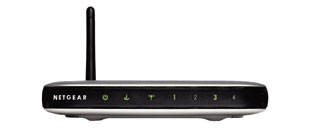
Went out at lunch yesterday, to Best Buy and picked up a D-Link “Xtreme G” wireless router (DI-624) to replace the Netgear one that just crapped out on us the…

Went out at lunch yesterday, to Best Buy and picked up a D-Link “Xtreme G” wireless router (DI-624) to replace the Netgear one that just crapped out on us the night before. I’ve had decent luck with D-Link in the past, and …

… well, not so much, this time.

Got it configured and working just fine. Not as attractive or small a unit as the old Netgear, but not bad.

Problem was, no matter what I did, I couldn’t get it above a Low signal to either Margie’s machine or mine. Maxed out at 5Mbps, and more often down around 1. Looked at all the documentation, tweaked the antenna and the orientation, upgraded the firmware, turned off the proprietary bits. Nada.

So, once Kitten was down, I dashed over to our local Best Buy, returned it, and picked up a new Netgear router (WGT624, I think). Brought it home, plugged it in, fired it all up …

… and it all worked perfectly. No problems. And 100% signal strength.

Odd. Not sure what was causing the D-Link the problems, unless it’s more sensitive to EMF than the Netgear ones are.

So I have a variety of security turned on — the built-in NAT and SPI firewalls, plus MAC authentication. Not going for WEP or WPA as of yet; the MAC bits should keep unauthorized folks out, so far as I can tell (you can spoof it, but you can break in on the other stuff, too). And, with luck, it should work for some time to come.

Dude! She got a Dell!

Margie’s finally gotten her long-promised notebook computer from the office, a Dell Latitude D600. W00T! Now comes the long process of … … getting it hooked up to our home…

Margie’s finally gotten her long-promised notebook computer from the office, a Dell Latitude D600. W00T!

Now comes the long process of …

… getting it hooked up to our home network.
… looking into docking station options (like this?)
… looking into KV switches for keyboard/mouse/monitor sharing between Margie’s home desktop and her notebook.

Things are now officially a Lot More Complicated. Though, if she sets it up right, she can bring it and use it out in California at the Ks like I do, and so on and so forth.

Memo to self

Slow response and reload time and access to domain time from home is, evidently, not a function of some local settings on my machine. Works much snappier, and for much…

Slow response and reload time and access to domain time from home is, evidently, not a function of some local settings on my machine. Works much snappier, and for much longer, from the hotel, and from the office, which makes me think it’s either (a) a problem at home, or (b) a problem with Comcast.

Firefox woes

Hrm. For a few days, at least, I’ve been having problems with buttons/links that should be opening up a popup window (or at least a new tab) not doing so….

Hrm.

For a few days, at least, I’ve been having problems with buttons/links that should be opening up a popup window (or at least a new tab) not doing so.

I suspected it might be Tab Mix, but that doesn’t seem to be the case. At least, I tried tweaking the settings to no avail, then I disabled it and restarted and the problem continued.

The most recent extension download I have is AdBlock. I may try disabling that and seeing if it stops being a problem.

Related (probably) problem — the FF process never closes completely, requiring me to manually shut it down in Task Manager.

Swell.

Simplifying matters

Nice. A single Firefox extension to replace five others I’ve been using: Tab Mix combines all the tab browsing goodies that I use of: Tabbrowser Preferences Duplicate Tabs Tab Clicking…

Nice. A single Firefox extension to replace five others I’ve been using: Tab Mix combines all the tab browsing goodies that I use of:

  • Tabbrowser Preferences
  • Duplicate Tabs
  • Tab Clicking Optoins
  • CTC
  • Flowing Tabs

Plus the tab headers are of variable width, I get a download status (color) bar, and it opens new tabs for stuff clicked from the Links list (Bookmarks Toolbar Folder). Shiny!

While the FF concept is to leave core functionality clean and extend it as desired, there’s nothing wrong with finding the features you want in a single extension rather than worrying about drug interactions from several of them.

The above link is to the normal Mozilla Addons page. This mirror page gives a bit more info. The home page for the project, alas, is having problems (which, yes, doesn’t fill me with confidence, but the ap seems solid, and comes well-recommended).

I’m going to run with it for a few days before installing it on Margie’s machine.