https://buy-zithromax.online buy kamagra usa https://antibiotics.top buy stromectol online https://deutschland-doxycycline.com https://ivermectin-apotheke.com kaufen cialis https://2-pharmaceuticals.com buy antibiotics online Online Pharmacy vermectin apotheke buy stromectol europe buy zithromax online https://kaufen-cialis.com levitra usa https://stromectol-apotheke.com buy doxycycline online https://buy-ivermectin.online https://stromectol-europe.com stromectol apotheke https://buyamoxil24x7.online deutschland doxycycline https://buy-stromectol.online https://doxycycline365.online https://levitra-usa.com buy ivermectin online buy amoxil online https://buykamagrausa.net

What’s in a Name?

Well, a lot when some nasty hacks over the last week or so on DNS servers are keeping people from getting name resolution to IP addresses. Which starts making things…

Well, a lot when some nasty hacks over the last week or so on DNS servers are keeping people from getting name resolution to IP addresses. Which starts making things intermittently accessible, and (possibly) leads to Comcast having nationwide broadband problems with their DNS services (according to their tech support people). Which means that getting to an actual website has been horribly flaky for us at home this evening (though, if we knew all the actual IP addresses, we’d be golden).

Bleah.

Making the case

Part of the weekend’s errands was buying a new briefcase. Oh, the excitement! My previous briefcase — a leatherish blocky satchel, from London Fog — was worn and tattered-looking. Hardly…

Part of the weekend’s errands was buying a new briefcase. Oh, the excitement!

My previous briefcase — a leatherish blocky satchel, from London Fog — was worn and tattered-looking. Hardly what a smart executive should be carrying, right? Plus, it didn’t protect the laptop all that well, to be honest.

So, after a lack of success at Office Depot and Best Buy, we swung past CompUSA. And, remarkably, they had a pretty nice selection.

I ended up with a nice soft-side briefcase, from Case Logic. It has this cool internal pocket for the laptop that not only is not in contact with the bottom of the satchel, but which has its own suspension system (oooooh, aaaaaah). It has some nice corner pockets for cables and stuff (since I carry a ton of them). And it holds, maybe, not quite as much internal paper space and books and the like, but that might not be a bad idea …

And it appears tough enough that I don’t worry it will look unprofessional in 6-12 months.

Thanks, Margie, for your patience during my shopping.

Good migrations

I am 90% migrated to the new machine, such that I was able to shut down the old one Friday afternoon. I have all the data files, etc., on my…

I am 90% migrated to the new machine, such that I was able to shut down the old one Friday afternoon. I have all the data files, etc., on my backup hard drive, which is all packed up and ready to come to work with me this morning …

Although, as I realized as I drove in, it’s actually sitting on the floor in the breakfast room, right next to where my brief case was. I tend to be … um … focused (in a zombie-like fashion) first thing in the a.m.

There are a few utils still not installed here — very handy and useful, but not essential (today, I hope). I don’t have any of the Palm sync or utility stuff, and some password/security stuff isn’t migrated, either. And I didn’t get Jaeger moved over, so I’m RSSless. At the very least, though, I have all the basic office productivity tools, documents, and browser bits.

And I have my new notebook, with a high-res screen (and far better graphics, CoH-wise, than my previous machine) and built-in WiFi (and Bluetooth, which I’ll probably put toward driving a mouse somewhere down the road). Life is good.

Clean sweep

One of the advantages of the computer rebuild is that it gives you a chance to fix (by every tech support desk’s favorite method, a fresh system) little niggling problems….

One of the advantages of the computer rebuild is that it gives you a chance to fix (by every tech support desk’s favorite method, a fresh system) little niggling problems. E.g., that IHateSpam came up with a (non-critical, but still annoying) “I crashed on start-up, do you want to tell Micro$oft?” error every time I booted my machine. Or that my old Adobe install was messed up so that when I would open a PDF, it would inevitably run a “I’m finishing configuring Adobe Acrobat” dialog.

It’s also an opportunity to not install stuff you’ve changed your mind about. Like, for example, Google Desktop.

The data transfers of the gods grind slowly …

After lunch yesterday, I got Outlook updated on my new PC — and spent the rest of the afternoon watching it crank away, synchronizing my (admittedly huge) message store down…

After lunch yesterday, I got Outlook updated on my new PC — and spent the rest of the afternoon watching it crank away, synchronizing my (admittedly huge) message store down to the notebook. Indeed, it wasn’t finished by the time I headed home, so I left it here at the office.

Last night, after staying up (too) late playing CoH, I finally started running a backup of my old PC. That added an hour to the get-to-bed time, while I shut down processes, did a MozBackup of Firefox and Thunderbird, and then got the backup started …

… not waiting long enough to see the message that the backup drive was full. Until, of course, when I came down this morning.

I cleared off some space (several Gb) and tried again, and watched as it slowly began to do its thing.

So I’m in the office late, with a partially installed (but synced-up, mail-wise) computer, while my other computer at home gets backed up. Woo-hoo.

Technological query

So my new computer has Bluetooth capabilities. Any suggestions as to what I might actually want to do with Bluetooth on my PC?…

So my new computer has Bluetooth capabilities.

Any suggestions as to what I might actually want to do with Bluetooth on my PC?

Gah!

Sometimes I embarrass myself. Like when I, out loud (and loudly) shout, “GAH!” when I get a voice mail that says my new notebook computer is here ……

Sometimes I embarrass myself. Like when I, out loud (and loudly) shout, “GAH!” when I get a voice mail that says my new notebook computer is here …

Application Man

And people wonder why I don’t want to casually migrate from machine to machine. Stuff I have installed that I want to install on the new PC (a reference for…

And people wonder why I don’t want to casually migrate from machine to machine. Stuff I have installed that I want to install on the new PC (a reference for myself, but for your entertainment, too):

Office Aps

  • Symantec AV* – anti-virus
  • Altiris* – client for help desk software and tech support
  • WinZip* – compression software
  • iPass* – VPN client
  • eRoom 6 client – collaboration suite
  • Lotus Notes client
  • JSRS – Notes-based employee reviewer package
  • Windows Messenger – Exchange and .Net IM client
  • Yahoo Messenger
  • MS Office 2003 suite (Word, Excel, Access, Powerpoint)
  • MS Outlook 2003
  • … IHateSpam
  • … LookOut
  • MS Visio
  • MS Project

Browsing and Blogging

    Firefox** – brower – see previous post for various extensions.

  • Thunderbird** – e-mail – see following post for various extensions
  • MozBackup 1.4 – FF/TB backup utility
  • AI RoboForm** – password/identity manager
  • Blogmatrix Jaeger** – RSS aggregator
  • QuickTime plug-in
  • Flash plug-in
  • Sync2It – bookmark backup service (drop?)
  • FileZilla – FTP
  • SmartFTP – another FTP?
  • SharpMT 2** – blogging client
  • Sun Java?
  • Adobe Acrobat Writer
  • IE Google bar

Graphics

  • Paint Shop Pro 8 – graphics editor
  • MS Photo Editor – (find it where it’s hidden)
  • XnView – another light graphics editor; haven’t used much

Palm Aps
(These are the client-side pieces of software; the Palm software wil stay there)

  • Palm Desktop – basic conduits
  • PocketMirror – sync software
  • Ultrasoft Brainforest – checklist software
  • SplashID – identity management
  • SplashPhoto – picture gallery
  • WordSmith – text editor, Word conduit
  • BackupBuddy – backup software
  • HealtheTech BalanceLog** – diet, weight, exercise tracker (the heart of the Geek Diet)

Games

  • City of Heroes** – with all the various downloads. Need to see if there are any migration tricks out there.
  • City of Heroes Planner** – character planner
  • TweakCOH – external access to game options
  • HeroStats – CoH stats tracker
  • CoH Maps
  • Dice Roller – a nice dice rolling utility
  • RPG Dice – another nice dice rolling utility

Miscellaneous Utils

  • iTunes** – MP3 player and organizer (migration 1, 2, 3)
  • PSA Cards** – phone/address list (now defunct)
  • EditPad Lite – JGSoft text editor
  • XReminderPro** – scheduler
  • MS NetMeeting – find it, give it a prominent icon.
  • Diamondsoft Font Reserve** – font manager
  • Bounceback Express – backup software for external HDD (needs HDD attached).
  • MS Broadband Networking – good WiFi client/monitor – obsolete with new WiFi setup?
  • Infotriever – tie-in between our travel agency and Outlook Calendar.
  • Google Desktop – desktop search. Undecided on this one.
  • Powertoys TweakUI
  • Powertoys Cleartype
  • Lavasoft Ad-Aware – spyware util
  • Spybot S&D – spyware util
  • SpywareBlaster – spyware util

* Should get installed as part of the standard image by the local tech support gremlins.
** Research backup/restore/migration possibilities, or use the ones I know are there.

I have the install programs for most of these — either CD or downloaded install files.

That’s a first pass, looking just at the Start menu for what’s installed. I suspect I’ll spot more if I begin looking in the actual Program Files directory …

And, of course, there’s all the stuff in the My Documents folders.

And people laugh when I say it takes me a couple of days to get a machine up to speed …

Foxy extensions

As I start looking toward migrating to my new notebook in a few weeks, my eyes are drawn to the Firefox extensions I currently have loaded. For folks’ edification ……

As I start looking toward migrating to my new notebook in a few weeks, my eyes are drawn to the Firefox extensions I currently have loaded. For folks’ edification …

Spiffiness
These make life (or the Internet experience) nicer.

  • BugMeNot: Bypass those annoying registration screens for some websites.
  • downTHEMall: Bulk graphics downloader.
  • ForecastFox: Put little weather icons in your status bar.
  • Wayback: Context menu access to the Wayback archive for web sites.
  • Google Pagerank Status: Shows Google pageranks, just like the Google search bar does.
  • ImgTag: Get an HTML img tag for a page’s graphic file (for direct links to it).

Tabbed browsing
Though FF supports it, these extend it the way I want it.

  • Tabbrowser Preferences: The sine qua non, controlling what opens up in a new tab, etc.
  • Flowing Tabs: Wraps the tabs around to multiple lines, rather than squeezing them into a single line. (A version 1.x-compatable version can be found here.)
  • Duplicate Tab: Adds a “duplicate tab” (into a new tab, or a new window) function.
  • Tab Clicking Options: Lets you do certain things by clicking on tabs in certain ways (e.g., close a tab by double-clicking on it).
  • CTC: Adds “Close tab” to the context menu.

Browser functions
These add to what FF does as a browser.

  • Adblock: Block image ads from download and/or display.
  • Flashblock: Block flash images from download and/or display.
  • ieView: Open a page in Internet Explorer (for those pages that must be so opened to function, dagnabbit).
  • Print It!: Adds a print and print preview button to the tool bar, as well as print functions to the context menu.
  • Add Bookmark Here: Adds to the bookmarking functionality.
  • Chromedit: Graphical interface to the various FF config files.
  • SpellBound: Nice spell checker for web forms.
  • Text Size Toolbar: Adds text size up/down controls to the toolbar.
  • Session Saver: Tracks tabs you’ve closed during a session, and saves (and can reopen) open tabs when you close FF (particularly handy if your machine crashes).

One of the cool things about FF is that, if you don’t want the functionality listed above, you don’t have to have it. And if you want something alternative (or in addition) to the above, chances are there are other extensions that have been created to do it. FF works fine out of the box, but these extensions make it work even better.

The sort of new PC I like to see

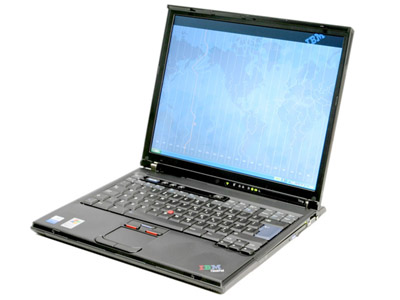
Got confirmation this afternoon from IBM that my new ThinkPad T41p will be shipping in a couple of weeks. Glee! And, it’s about time … Of course, there’s a finite…

Got confirmation this afternoon from IBM that my new ThinkPad T41p will be shipping in a couple of weeks. Glee! And, it’s about time …

Of course, there’s a finite chance I’ll have a business trip before that happens. Can’t be helped, alas. But at least I’ll have a new PC out of it all.

The PC replacements of the gods grind slowly …

Faxed off the invoice info. Got a call back, asking what our current standards are, so that they send back a machine supported by our standard loads. Excellent. Just need…

Faxed off the invoice info. Got a call back, asking what our current standards are, so that they send back a machine supported by our standard loads. Excellent.

Just need to confirm what our standard is, but the model it looks like I’ll be getting (ThinkPad T41p) will have many nice bells and whistles, including a Pentium-M 1.7GHz, plenty of RAM, 60Gb HDD, built-in wireless (802.11b, which will work on our home network, and Bluetooth), 1400×1050 SXGA (only 14.1″ though) screen with 128Mb RAM on the card.

Sweet.

It will have been painful to go through this inconvenience, but it would be pretty spiffy to get a nice new machine out of it, a good year-plus before I could otherwise expect it.

And more on the fubar PC front

After yet another noodge, a new fellow from IBM contacted me to get information about the replacement. He promises he’ll have further info “in a few days” — but, in…

After yet another noodge, a new fellow from IBM contacted me to get information about the replacement. He promises he’ll have further info “in a few days” — but, in the meantime, now we have to dig up an invoice for my PC. Joy.

Mission Accomplished

About a week ago, Margie said, “I think I’m finally ready for you to install Firefox on my machine. I think you’ve thrashed all the bugs out of it on…

About a week ago, Margie said, “I think I’m finally ready for you to install Firefox on my machine. I think you’ve thrashed all the bugs out of it on your PC.”

Heh.

Mission accomplished.

Technical Difficulties

Updates at home and work … At work, I didn’t hear back by COB yesterday as to what IBM was going to do for my dead notebook screen, so I…

Updates at home and work …

  • At work, I didn’t hear back by COB yesterday as to what IBM was going to do for my dead notebook screen, so I followed up with a pointedly querying e-mail. Hey presto, I got a response, to wit, they didn’t have any A31s amongst their customers, so I couldn’t swap one out. But … he was going to put me in for a “mechanical replacement,” so that I’ll be getting (I believe) a … new laptop. Zowee!
  • At home, the Comcast tech support folks showed up to work on the cable broadband drops. Told them all the stories, so that they knew that when the Mother Ship suggested swapping out the modem, the fact that we were on Modem #3 was already know. They reverified the outside wiring, determined that the modem was responding properly, and that the logs in the modem did indeed show the thing recycling over and over.

    Alas, the home office system they wanted to use to correlate the modem outages with the local neighborhood was out. So all they could do was have the Mother Ship reset the DNS file on the machine, noting that could potentially cause problems. The lead tech, Tim, said he’d call in the morning to see if the problem recurred, and to do the next bit of diagnostics.

    Got a call tonight form the Mother Ship, saying that they’d (finally?) run a neighborhood check and that there were, indeed, outages going on all over the neighborhood. They’re sending out a network tech tomorrow morning to monitor the stuff locally, and will get back to us …

    And, of course, the system has been running just fine tonight …

The laptop saga continues

Our IBM rep has been hard at work. Lots of interesting developments, per my phone discussion with him this afternoon … First off, they do not have a plug-n-playable replacement…

Our IBM rep has been hard at work. Lots of interesting developments, per my phone discussion with him this afternoon …

First off, they do not have a plug-n-playable replacement system. The A-series Thinkpad is no longer in manufacture, and they have none in stock. Rats. Data transfer and program reinstall is inevitable.

(To be fair, if I used a standard-image notebook, vanilla-configured, this wouldn’t be a huge deal. Since I highly configure my machine, not to mention install nonstandard bits like Firefox and CoH, it is a problem, albeit one I can’t squawk too loudly about.)

He’s still been looking into one of three possibilities (in this order):

  1. Do any of his clients, who also have A-series machines, have a spare they could loan?
  2. Shipping an alternative laptop (T-series) for me to do the data/program shuffle on.
  3. Simply sending me a permanent “mechanical replacement” system, which would still mean a data transfer.

I raised the issue that this appeared to be the same problem as last time, and if IBM knows what it fixed then, they could let a local repair shop know and have the part ready. Being out my machine for 36 hours would be better than 3-5 business days (minimum). He doesn’t seem as interested in this, which makes me wonder what IBM tech support is telling him about my problem.

We discussed what level of functionality I’m at (I can get by as long as I’m someplace with a monitor to plug into, which is not conducive to being away from my office desk — e.g., on jury duty on Monday).

I noted that I’d prefer alternative #3 to #2 above — not so much because it would be a new machine (though that’s nice) but because it would mean only a single transfer of data (assuming it doesn’t break, too). And I’d need to do next time I get a new machine anyway, right?

He was very sympathetic to my ongoing problems and present difficulties (in a customer service sort of way — I’m not sure if I’m being treated as a VIP, treated to make me think I’m a VIP, or that I work for a Very Important Company to him), and committed to having a solution for me …

… by COB today.

We’ll see.

Fubar PC update

Our procurement liaison with IBM has been working our IBM rep to do something. I wrote a firm, civil, politely threatening e-mail to same, indicating what level of service I…

Our procurement liaison with IBM has been working our IBM rep to do something. I wrote a firm, civil, politely threatening e-mail to same, indicating what level of service I found (un)acceptable, and was pleased to play off of both our procurement lady’s reference to me as one of our “senior IT managers” and my formal title as “Director.”
None of which is the sort of game I usually play, but it seems to have worked, kinda, in this case. Dude has now committed to shipping me out a loaner if they can find one that’s plug-and-play compatible with what I have on my hard drive.

I should know more tomorrow. Here’s hoping …

Das Blinkenlights sind Kaput

Our cable modem service started flaking out again last night (right in mid-chat with the Strategist, no less). Fortunately it was after we’d done the majority of our gaming for…

Our cable modem service started flaking out again last night (right in mid-chat with the Strategist, no less). Fortunately it was after we’d done the majority of our gaming for the night, but it was still irksome.

Margie reports similar flakiness this morning.

Given that it’s a new modem (the second new modem, in fact), and that it’s been pretty much stable for the last week or two since it was installed, I reject any notion from Comcast tech support that it might be static, or heat conditions, or anything other than either crappy equipment somewhere along the line. Which means I expect them to fix it right now.

I am going to be most put out if I can’t get online this afternoon.

Spam, spam, spam and Thunderbird

Interesting article from Adot about how it’s possible to over-train Thunderbird’s spam filter, by repeating too much of the same spam (presumably so that new patterns are overwhelmed by the…

Interesting article from Adot about how it’s possible to over-train Thunderbird’s spam filter, by repeating too much of the same spam (presumably so that new patterns are overwhelmed by the number of old ones).

Dead Backlighting Update

Well, the backlighting on the Thinkpad is still dead. That’s the short form. Long form is this: I’ve got an old 14″ monitor set up on the breakfast table at…

Well, the backlighting on the Thinkpad is still dead. That’s the short form.

Long form is this: I’ve got an old 14″ monitor set up on the breakfast table at home (and let me mention how entertaining it was to reset the resolution on the PC to that, nearly blind, when I found that it was limited to 1024×768, repeating same to reset City of Heroes to a lower rez, too).

IBM has been contact, since the notebook is still under warranty until November. Their brilliant solution is to ship the machine back to them, to be returned in [insert meaningless commitment date here].

I still have the other “perma-loaner” Thinkpad, the T40. I could do it — but, damn, I really don’t want to migrate everything to another machine, reinstall all the aps, struggle with the settings, etc., just to go back again in 2-3 weeks. Gack.

Can’t requisition another company notebook for at least another year. We’re on a 4-year “refresh if you can justify it” cycle, and this is Year 3.

Might be able to take it down to a local IBM authorized repair center to do whatever IBM did last time, except that (a) nobody has a record of what they did last time, and (b) the person who had those records was let go from our help desk back in January (shortly after my machine returned last time) and deleted all his records and paperwork on the way out (the bastard).

Our procurement person is trying to talk our IBM account rep into just replacing the damned machine, which would still mean a migration (unless the HDD and boot image were compatible), but would be (God willing) the last one for a while. Stop me if you’ve heard that one before …

Stay tuned. Hope I don’t have to travel any time soon.

Firefox incompatibilities

Rrg. While many FF proponents tout how Firefox can work with anything (except for M$’s evil Windows Update site), and thus they never use IE, I am not nearly so…

Rrg.

While many FF proponents tout how Firefox can work with anything (except for M$’s evil Windows Update site), and thus they never use IE, I am not nearly so lucky. IE is our company standard, and any number of applications we have require its use, either explicitly or because they don’t display correctly otherwise.

I don’t necessarily blame FF for this — I’m sure the majority of it is a matter of either IE-“standards”-specific coding (ActiveX or not), or, in some cases, just goofines. For an example of the latter, we use an aging version of eRoom for some document collaboration projects. It does not (at that version) support Firefox — and it confirms that to you by not letting you even try. Click on an eRoom link, and it routes you to a “this only use IE version xyz or Netscape 4.7” page. Now, I suspect that if it supports NS 4.7, it will support FF, but the program doesn’t even give you a chance.

Now, ieview extension. If I go to a page that doesn’t work with FF, I right-click and choose ieview from the context menu and the page is opened up in IE. Nice. Alas, that doesn’t work with eRoom, since you’re not on a malformed page, but on the error page.

So if someone sends me a link to an eRoom page (again, this is an older version of the ap), I have to cut and paste the link into IE, since I have (like all truly sane people) FF as my default browser. And Outlook doesn’t support a “Send To” context item for links (I wonder why …).

Rrg.

Anyway, I am used to having apps (our payroll system, our expense report system, various specialized HR apps) not working under FF. And that’s vaguely annoying, but okay, since I still like FF enough to want to use it all the rest of the time, and on the vast majority of the sites that I visit.

Interestingly, the next version of ieview will let you configure a list of IE-always sites, so you can still open stuff up from inside of FF and have it open up IE automatically. That’ll be convenient.

Just wanted to gripe. Sorry. Go on about your business.