https://buy-zithromax.online buy kamagra usa https://antibiotics.top buy stromectol online https://deutschland-doxycycline.com https://ivermectin-apotheke.com kaufen cialis https://2-pharmaceuticals.com buy antibiotics online Online Pharmacy vermectin apotheke buy stromectol europe buy zithromax online https://kaufen-cialis.com levitra usa https://stromectol-apotheke.com buy doxycycline online https://buy-ivermectin.online https://stromectol-europe.com stromectol apotheke https://buyamoxil24x7.online deutschland doxycycline https://buy-stromectol.online https://doxycycline365.online https://levitra-usa.com buy ivermectin online buy amoxil online https://buykamagrausa.net

Technology that actually makes my life easier

After using it for a few weeks, I can heartily recommend Lookout, a search add-on for Outlook. At a minimal cost in background processing (and dollars), it provides near-instant search…

After using it for a few weeks, I can heartily recommend Lookout, a search add-on for Outlook. At a minimal cost in background processing (and dollars), it provides near-instant search for content through your various Outlook forlders. For someone with hundreds of megabytes of info in online folders and archives, it’s priceless. Searches that Outlook would take minutes on for a single folder now pop up in seconds. I easily saved half an hour this week, which more than paid for the license. Good, good stuff.

I’m also becoming quite a fan of Jäger, a blogroll/RSS reader/updated stuff detector that works in conjunction with your browser. I’ve never quite gotten into RSS readers per se, but this does an even better job, IMO, of detecting updated sites and entries (it has alternatives to RSS feeds, for example). Some folks will find its use of the browser for actually showing pages a disadvantage (for at-work browsing, for example), but I find it a plus.

Nice little product.

Busy, busy, busy?

Realized I hadn’t posted here today so far. A good part of that has been due to lots of activity on a couple of projects I’m running. But I’ve had…

Realized I hadn’t posted here today so far. A good part of that has been due to lots of activity on a couple of projects I’m running.

But I’ve had time for sidebar fun, too.

  • I’m trying out a program called Lookout, a mail indexing and search program for Outlook. So much of my work is bound up in Outlook, it’s a never-ending nightmare to find things. I’m hoping this tool works.
  • I’m also trying out a program with the improbable name of BlogMatrix Jäger, which is — well, sort of a cross between an RSS reader and Blogrolling.com. You put in blog sites (and web news sites), and it figures out how best to (a) tell when they’ve been updated, and (b) what the updated post/news titles are. You can then open up the entries in your regular browser. It has several different ways (not just reliant on RSS) of spotting updates. Looks pretty keen so far.

  • And I’ve been poking about at the rules for FATE, a FUDGE-based RPG that I may be using to replace the Spycraft D20 rules in my game (which will be news to some folks). I’ve been putting together some notes on that at my game wiki. No changes anticipated until this module is over, at least.

And between a general resolve to steer away from (geo)political ranting and raving, and stuff coming up in the evenings, I’ve just not had as much time to post here as I’d like. Ah, well.

Re-flections

Take a company with people in both US and Europe. Add in mail systems that don’t recognize other languages’ reply prefixes (“Re:” and “Réf:”) and so omit adding a new…

Take a company with people in both US and Europe.

Add in mail systems that don’t recognize other languages’ reply prefixes (“Re:” and “Réf:”) and so omit adding a new one when doing a reply.

Mix in a long e-mail thread.

And you end up with an e-mail message that looks like “Re: Réf: Re: Réf: Re: Réf: Re: Réf: Re: Réf: Re: Réf: Re: Réf: Re: Réf: Re: Réf: Re: Réf: Performance Issues”

A thing of beauty. And sort of a catchy tune, too.

Wired

Microsoft is discontinuing its line of Wi-Fi hardware. Which is a shame, because we’ve bought some of it, and it’s actually pretty good, both in the hardware and software department….

Microsoft is discontinuing its line of Wi-Fi hardware.

Which is a shame, because we’ve bought some of it, and it’s actually pretty good, both in the hardware and software department.

Ah, well.

Master of my domain

My machine got migrated to a new domain in our Active Directories project thang. Which was fine, I suppose, except for several long minutes it looked like I was going…

My machine got migrated to a new domain in our Active Directories project thang. Which was fine, I suppose, except for several long minutes it looked like I was going to lose … well, pretty much all my settings. And fonts. And …

Well, false alarm. It was all there on my machine, just not being pointed at any longer by the machine. Eek! Fortunately, our fine tech support folks managed to get everything more-or-less back in order (the only thing lost seems to have been all my cached passwords, dagnabbit). So all’s right with the world.

More words one would rather not hear on the phone from one’s wife

“Our computer is DOA.”…

“Our computer is DOA.”

Technical note

Streaming Video (and Streaming Audio) across our WAN sucks. Where the hell did I put that (low tech) radio?…

Streaming Video (and Streaming Audio) across our WAN sucks. Where the hell did I put that (low tech) radio?

Technical Difficulties

Okay, not holding out much hope here, but in case one of my Many Readers is, in fact, an expert in this area … I’m part of a pilot Windows…

Okay, not holding out much hope here, but in case one of my Many Readers is, in fact, an expert in this area …

I’m part of a pilot Windows Messenger (IM via Exchange) group in my company, and, after about a year of the service working just fine for me, I came to realize that my WM was not working correctly.

Testing on another person’s machine demonstrated it wasn’t my account configuration; I can sign in elsewhere with nary a problem.

On my machine, though, it appears that the WM client polls the Exchange server up front just fine, to get the current contact status. After that, though, it never polls the server. I can send IMs just fine, but nobody can send them back to me (sometimes they get an error saying I’m not signed in, sometimes not), and my contact list never gets its status updated.

At our internal IT folks’ behest, I’ve uninstalled WM as much as possible — it’s a Windows component, so the most you can theoretically do is uncheck the box to keep it from starting; I’ve also found an uninstall script (running rundll32 against the original inf package for the previous version, which I’ve run), and I’ve zapped the directory and the Registry keys I recognize for it, and downloaded the latest-greatest (5.0). That version, though, still thinks the system is there; it gives me just a Repair option.

At any rate, still no go.

I am not using a proxy, I am not behind a firewall, and everything should be right as rain. The alternatives I’m being given are either (a) rebuild the machine from scratch, or (b) don’t use WM. If it comes to that, I’ll go with (b), but if anyone has additional ideas, I’m open to them.

UPDATE: I’m pinging the folks on this MS support board, so we’ll see if they have any answers.

Oooooh … critical

Okay, so I can be politically sensitive. And I can understand why Microsoft would prefer to remove the swastikas from their Bookshelf Symbol 7 font (which seems to be distributed…

Okay, so I can be politically sensitive. And I can understand why Microsoft would prefer to remove the swastikas from their Bookshelf Symbol 7 font (which seems to be distributed with Office 2003). And, like this site, I could ask, How do you mistakenly include not one, but two swastikas in a product? .

But … um … while I appreciate their sending out an automatic update to “fix” the problem, is that really a Critical Update for Windows (italics mine)?

This item updates the Bookshelf Symbol 7 font included in some Microsoft products. This font has been found to contain unacceptable symbols.

Based on this Microsoft KB article, doing this could break Japanese installs of O2K3. Swell. This KB article, which updates it, softpedals that problem, though it doesn’t go into any more detail.

According to this article, the font was licensed from Ricoh, and is used (reversed) as a Buddhist symbol of good luck and prosperity, and is frequently seen on Japanese maps for Shinto temples, which might explain why it was there in the first place.

The Register notes that not only do the swastikas vanish with the update, so does another symbol that some folks might consider too politically charged.

But, regardless of the reason, does it really deserve to be called a Critical Update?

Music, hark!

I’ve been using iTunes for Windows for a few months now, and enjoying it pretty well. It’s a fine MP3 player and ripper (the extent of its features I’ve used)….

I’ve been using iTunes for Windows for a few months now, and enjoying it pretty well. It’s a fine MP3 player and ripper (the extent of its features I’ve used).

A couple of things about it drive me batty, though, probably because of interface differences (expectations) between Windows and MacOS.

In Windows aps, generally, if you highlight a line in a database list and then change the sort, that line is still the current highlight on the screen. So, if I’m sorted by Genre and run across an artist and highlight that line and click on the Artist column to force a sort by that, I expect to now be looking at everything by that artist. Instead, I’m back up at the beginning of the list, and have to scroll down. (Yes, the query filter at the top of the screen kind of does that, but that’s a different interface model.)

I like the expanded attribute set of things to note about various tunes, but am frustrated in doing updates. The “Get Info” (which actually lets you Set Info) screen is great for mass changes, but for one-line changes, I expect (like a database) to be able to edit the lone record I’m pointing at without having to pull up a separate edit screen.

Well, I can do that, but if I’m doing more than one, I have to then re-click, carefully, slowly, on the next line. I’d like to be able to tackle the data like a spreadsheet.

Other minor bitches:

I wish that the “Last Played” field for song updated when the song was started, not when it finishes. If I decide a song is crap, I don’t want to have to leave it running through to the end to be able to know I’ve listened to it (rating notwithstanding).

The help system sucks. This is not an Apple-specific flaw, by any means, but that doesn’t make me feel better about it. You’d think, for example, that one of the song attributes, “Grouping,” would be defined in the help files. Nope. I think I know what to use it for, but damned if the program is willing to tell me.

The CDDB database seems more limited in its information than some I’ve seen used by other tools. I also desperately wish there were a way to reinquire on a ripped track in the library; the CDDB look-up only seems to work on tracks on the CD itself.

That said, a good tool, especially for the price (free).
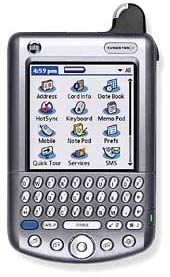
Palm of my hand

Well, I’m pretty much moved over onto the new Palm. I’m still tweaking a few things that don’t work under OS 4, a few utils that are no longer needed,…

Tungsten WWell, I’m pretty much moved over onto the new Palm. I’m still tweaking a few things that don’t work under OS 4, a few utils that are no longer needed, doing the latest system updates, things like that.

The screen is certainly brighter and clearer (and more colorful) than my old Vx. The machine fits the cradle, though, a lot less securely.

The unit itself, without case, is about the same size as my Vx in its hardcase (not counting the antenna nubbin). Annoying extra thickness, but the price was right.

Syncs go a lot faster over USB than Serial. And the machine itself is faster, and has more memory.

Haven’t had to do a lot of work on it thus far, so the whole keyboard-vs-Grafiti thang is as yet unexplored. I can definitely see, though, where a lot less stylus use is needed.

I don’t expect I’ll be using the wireless functionality, which seems like a darned waist. But I like my cell phone (granted convenience of integrated phone list aside), and I really don’t have a need, at present, for persistent e-mail and browsing capability wherever I go. That may change at some point, but not now.

Be careful what you ask for

About four months back, one of our senior IT managers left for better opportunites. She left behind a brand-spanking-new Palm Tungsten/W. It was offered up for grabs briefly, but somenoe…

About four months back, one of our senior IT managers left for better opportunites. She left behind a brand-spanking-new Palm Tungsten/W.

It was offered up for grabs briefly, but somenoe nabbed it before me. Which, I thought, was a shame, because my old Palm Vx is getting pretty long in the tooth.

I was doing a favor for the person who got the Tungsten a month or so ago, and she jokingly said, “Well, if you managed to do X, I’ll ship you Susie’s Tungsten.”

Whoa.

I actually didn’t manage to get X done, but she was happy enough with my efforts to do so that she shipped it along anyway. And it arrived while I was on business.

Only, to be frank, it’s not the Palm I would have ordered if I’d ordered one new.

Granted, it’s a hell of a lot better than a poke in the eye with a sharp stick. But its main raison d’etre seems to be to act as a cell phone. It also has Web-browsing and e-mail capabilities (both of which are tied to AT&T wireless service).

Problem is, that’s not what I’m needing. And the integrated antenna poking up isn’t it, either.

On the other hand, it’s certainly a better hand-held unit, per se, than my Vx. And its a $400-plus PDA, which, if I turn down, I’m not likely to be able to request in a different form any time soon.

Hmmmm.

Yes, I know this sounds like a “Jeez, I wish I had that kind of problem” sort of situation, and I acknowledge it’s the sort of embarrassment of riches that it a not-bad thing to have. But it’s sort of like angling for a sporty company car to replace the old banged-up sedan, and getting assigned a new Lincoln Town Car instead. Sure, it’s nice, but it’s not quite what you were looking for …

When I get a chance, I’ll have to open it and see what’s what.

Browsy goodness

One of the most annoying bits of behavior in Web browsing (and I don’t know that it’s true outside of Windows, or outside of IE — I can only speak…

One of the most annoying bits of behavior in Web browsing (and I don’t know that it’s true outside of Windows, or outside of IE — I can only speak to my own experience) is document files that open up in the native application inside the browser.

There you are, viewing the darned thing, but if you want to save it to disk, or edit it and do stuff with it — well, there’s no menu bar or toolbar for the app, just the browser toolbar.

You can spoof the browser into letting you save it by making some sort of change and then going to another link, or clicking Back. The browser will note that the contents have changed, and let you save it if you want. But that’s still ugly. And you then still have to open it up from disk to further edit it.

Now I’ve learned you can get around this. No, really. I’ve been bitching and moaning about it whenever I’ve clicked on an Excel spreadsheet or Word doc on our Intranet for … well, years.

And now I know the secret solution.

Continue reading “Browsy goodness”

End of an Era

I remember when Windows 95 came to town. Suddenly, a desktop metaphor that always seemed clunky as hell (Win3x) became — something usable. A dozen different utilities became obsolete. It…

I remember when Windows 95 came to town.

Suddenly, a desktop metaphor that always seemed clunky as hell (Win3x) became — something usable. A dozen different utilities became obsolete. It was a system, an interface, I could work with, not work around.

Sure, Win9x had problems. It was built on top of DOS, for one thing. But Win9x drove the final nail into the Windows-vs-MacOS debate. The MacOS, in its different flavors, may very well be a superior OS, but as far as interface issue go, it’s not superior enough. Win9x does the job just well enough.

Last week, MS pulled the plug on Win98 support; 95 went away a long time ago. WinME loses its support at the end of the year.

Most companies, I suspect, have already made the cutover to Win2K or WinXP (or Linux, etc.). We’d certainly been pretty much forced to here, based on OS/NOS interactions. But a lot of home systems still run on Win9x, and, for some people and applications, the underlying OS is a lot less critical than it once was.

It’s worth noting that about 24% of my visitors here use Win98 (about the same as use Win2K). That will, of course, over time, continue to dwindle.

Time marches on.

I am now officially old

Quoth my mom: This morning when we talked I forgot to ask you whether you think the book Peter Norton’s DOS Guide is worth keeping. Dave you gave it to…

Quoth my mom:

This morning when we talked I forgot to ask you whether you think the book Peter Norton’s DOS Guide is worth keeping. Dave you gave it to us for Christmas in 1988.

Yeesh. I know people who use computers who weren’t even born in 1988.

As a collector’s item, though …

Earning my Techie Chops

Whilst some folks were engaging in holiday seasons of drunken debauchery, I was reestablishing my internal “Yes, I am a Technical Dude” certification. For Jim and Ginger I set up…

Whilst some folks were engaging in holiday seasons of drunken debauchery, I was reestablishing my internal “Yes, I am a Technical Dude” certification.

For Jim and Ginger I set up a personal domain, set up an e-mail account (through our host) for that, convinced them to order DSL and then got it installed and configured. I also set up a cheat sheet for them to access their account when away from home, and on how to back up their documents to their CD-R drive. We also were involved in getting Jim a digital camera and photo printer, and I got it all configured and wired together and a process written up so they download the photos and e-mail them and print them and other good stuff.

For my folks, I got them set up with a domain e-mail of their own, and configured their e-mail system to use it.

I also got a domain e-mail set up for Mary, and just talked her through some DSL questions.

I feel very technically adept. Just in time to get a rude awakening at the office tomorrow … 🙂

Rrg. Argh.

My folks got their DSL in over the weekend. Before we got our broadband. *SIGH*…

My folks got their DSL in over the weekend.

Before we got our broadband.

*SIGH*

Yet more Signs of the Apocalypse

My folks have ordered DSL. (It’s fortunate my own cable broadband order is due to be installed next Thursday, or else I’d be quite cross.) Margie now has an Amazon…

  1. My folks have ordered DSL. (It’s fortunate my own cable broadband order is due to be installed next Thursday, or else I’d be quite cross.)
  2. Margie now has an Amazon Wish List.

I’ll leave it to you as to which is a greater defiance of the laws of God and Physics.

Smart e-mail?

I’ve been reluctant to move away from using Outlook Express for my personal POP mail, largely because it’s worked pretty well for me, all things considered. But one feature would…

I’ve been reluctant to move away from using Outlook Express for my personal POP mail, largely because it’s worked pretty well for me, all things considered.

But one feature would make me fall in love with any e-mail client out there: learning-by-example.

I want the program to learn, from the folder I drag the message to, what messages should automatically go into that folder. (I’d like to be able designate folders as non-learning, too, but that’s icing on the cake.) It would probably be some sort of Bayesian learning process; in fact, I could, in theory, get POPFile (my spam filter) to do it, except that it’s not terribly convenient to do more than just flag spam/not-spam in it. Having it analyze multiple word combos would be helpful, too.

If I could get something that would work by rules defined empirically, rather than my having to figure rules out, would be truly awesome.

Does anyone know of anything like that?

Oddball

Am I the only person in the world who puts their XP taskbar on the left side of my screen? I like that it gives me longer minimized tabs, so…

Am I the only person in the world who puts their XP taskbar on the left side of my screen?

I like that it gives me longer minimized tabs, so I can see what something is. I like having longer document windows, rather than wider ones. I just find it handy.

And XP certainly supports it. You can lock the taskbar on any side of the screen, not just the bottom.

Pretty much every application is sensitive to taskbar placement — at the bottom. Open up an appliction, and if the taskbar is too fat on the bottom, the ap will tend to shrink up from it so that it meets up.

But not on the left. I don’t know how many applications I run that open up a window on the left border of the desktop — regardless of the placement of the taskbar. Which then means dragging the window to the right so I can see that the hell it’s all about.

Okay, that’s enough idiosyncratic bitching for the nonce.