Les has more. Much more.
It’s amazing one man can contain so much stupidity without imploding in on himself.
The Cult Religion of Firefox. Les has more. Much more. It’s amazing one man can contain so much stupidity without imploding in on himself….
Les has more. Much more.
It’s amazing one man can contain so much stupidity without imploding in on himself.
I’m sure I read something about this somewhere, sometime, but damned if I can figure out where. My Excel installation has suddenly decided that it’s going to pause every minute…
I’m sure I read something about this somewhere, sometime, but damned if I can figure out where.
My Excel installation has suddenly decided that it’s going to pause every minute or two, go through a monstrous flurry of network activity (locked during that time frame), then return to normal. Similarly, certain formatting functions immediately cause a flurry of network activity (and locking up of the machine).
These are locally saved files, and I don’t see anywhere in Excel anything pointing to an external data source.
I haven’t lit on a Google search that doesn’t return over a million hits based on the terms given. Anyone have any ideas?
Last night, I heard my Blackberry at dinner. “Ding.” “Ding.” Pause. “Ding.” “Ding.” “Ding.” My boss had gotten off the plane and dumped all his 40-odd e-mail messages to/cc me…
Last night, I heard my Blackberry at dinner. “Ding.” “Ding.” Pause. “Ding.” “Ding.” “Ding.”
My boss had gotten off the plane and dumped all his 40-odd e-mail messages to/cc me onto the system at once. He’s one of two people I have on “notify me immediately of incoming e-mail” setting on my BB.
It was amusing … in a “yeesh” kind of way. (And, no, I didn’t answer them at the dinner table. Or, honestly, until this morning. Though I was a bit more diligent about getting onto e-mail first thing this a.m. …)
Cable data’s out. Poop….

Cable data’s out. Poop.
Back in my old Treo days, I was able to communicate with directly with Yahoo Messenger by way of SMS — there were special short codes for all my correspondents,…
Back in my old Treo days, I was able to communicate with directly with Yahoo Messenger by way of SMS — there were special short codes for all my correspondents, etc.
Problem is, those don’t seem to work from SMS with my Blackberry. Nor does the spiffy RIM Blackberry Yahoo client work (it explicitly is not currently supported on AT&T/Cingular networks). There is a web-based client — but I really don’t want to be hanging out in the browser on my phone.
Of the SMS/Text Messaging-based stuff, I can find not a word on the US Yahoo sites. It’s as if the technology was removed coincident to my getting the BB. I do find stuff on Yahoo sites elsewhere in the world, but the codes, don’t seem to work.
Now, on the other hand, the Google Talk client works like a champ — autoconnects just fine, receives messages integrated into the Blackberry’s messaging system, etc. It’s super-spiffy.
I’m pretty happy right now with my Blackberry Curve. It was very convenient (perhaps too convenient) in the meetings I was in last week, and it’s working out quite nicely…
I’m pretty happy right now with my Blackberry Curve. It was very convenient (perhaps too convenient) in the meetings I was in last week, and it’s working out quite nicely for me.
One tool on it I’m sorely missing, though, is better timed control over the “profiles.” A profile is a configuration for how the BB lets me know a message, phone call, voice mail, e-mail, IM, or other notification has come in. I can configure noise, vibrations, and LED indicators for each of those, and can actually distinguish between in- and out-of-case conditions.
Though it’s easy to manually change profiles from, say, “Normal” to “Quiet,” I’m really bad at doing so. The BB does have an “Auto On/Off” function that will turn the phone off and back on at a fixed schedule on Weekdays and on Weekends — but I could wish for a better control and options.
I had a nice application, Central, on my Treo which did this. It let me set up multiple schedules to mute the phone — so, for example, I told it to mute my phone on weeknights between 11:30p and 5:00a — but on Saturdays until 10 and on Sundays until 11 (so it stays mute in church). I could also tell it to mute during my karate class on Tuesday and Thursday evenings. It also let me just mute it ad hoc (which is always dangerous when you forget to unmute it — which is why I prefer automation).
I’ve yet to find it, but it would be swell if there were a BB utility that would let me schedule profiles for given times/days of the week. It would be even more swell if I could tell it to start a profile for a period of time (“I’m sitting down for a movie, so let me turn my phone to quiet for the next 3 hours”), but that would just be icing on the cake.
If anyone knows of something that can do this, please let me know.
Central on Treo
Weird. Mozilla’s looking to spin off Thunderbird so they can focus exclusively on Firefox. My first thought it to be disappointed, if not appalled — the best community project e-mail…
Weird. Mozilla’s looking to spin off Thunderbird so they can focus exclusively on Firefox. My first thought it to be disappointed, if not appalled — the best community project e-mail system and browser splitting up? Say it ain’t so, Joe!
But, on the other hand, I don’t use T’bird any more. Indeed, of the people I know, most are using an online mail system (Gmail, etc.), rather than a tied-to-a-PC mail client (unless it’s corporate mail, like Outlook or the like). There’s a lot more bang for the buck to focusing on F’fox than T’bird, both for Mozilla and for the computing public.
Still … kind of sad, if it comes to pass. I actually switched to T’bird before I switched to F’fox, and both are sort of like family to me.
(via Amanda)
Etc., etc. Who was St Philaster? DOF writes persuasively that a conservative Supreme Court (at least a 5-4 one) might not be as bad as liberals think, if it…

Etc., etc.
It is amusing that e-mail shows up on my Blackberry faster than it does in my online Outlook. It is disconcerting that when I press the “off” button (hang…
In no particular order … Annoying that it doesn’t come with even a cheap little carrying case. I know, carrying cases for cell phones are so passe — but I…
In no particular order …
So far, so good.
It was a day of Good Things Arriving. First off — my Blackberry Curve finally arrived. It’s about half the thickness of my Treo, about 2/3 the weight, a scosh…
It was a day of Good Things Arriving.
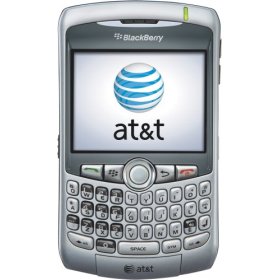
First off — my Blackberry Curve finally arrived. It’s about half the thickness of my Treo, about 2/3 the weight, a scosh wider, and had enough differences in the QWERTY keyboard to drive me crazy for a week or two — not to mention a suite of menu items that are both poorly organized and nigh overwhelming … but it’s here, it works, I’m already taking pictures and checking e-mail and setting ring tones and all that jazz. Huzzah!
Biggest problem so far? Wanting to reach for the stylus to tap on the touch-screen (rather than using the clever little “Pearl” roller ball).
When I arrived at work, I found a box outside my door. Some of the art we bought in Santa Fe had arrived.
It wasn’t practical to ship one of the other art items on their way to my office — well, it would have been practical, but not easy to get home. But it did show up, eventually (once UPS realized that, no, they hadn’t dropped it off at a mystery address signed for by a mystery person).
More art to come, but that’s all that arrived today. Aside from the sprinkler people hired by the contractor people who work for the Comcast people to fix the sprinker wire they busted while planting the cable wire they needed to replace. But at least now all the sprinkler zones work (except for the one where I need to replace a head with something that casts further, and the ones where the heads are overgrown by the foliage).
Glee! Of course, near heart attack when UPS said it had been delivered and signed for by someone else … UPDATE: And the first picture shot from my Shiny…

Glee! Of course, near heart attack when UPS said it had been delivered and signed for by someone else …
UPDATE: And the first picture shot from my Shiny New Blackberry Curve. Woot!
My Blackberry is in, the voice account has been transferred over to it (after the Nice Telcomm Lady spent an hour with some ditz at Cingular who insisted my account…
My Blackberry is in, the voice account has been transferred over to it (after the Nice Telcomm Lady spent an hour with some ditz at Cingular who insisted my account has been canceled since December), and it’s now in the hands of the techies who are activating the e-mail on it.
So don’t call me, since I don’t have my cell phone on me … yet.
Woot!
Getting ready for my shift from the PalmOS-based Treo to the Blackberry, due to arrive (I hope) Monday. I’m going to miss the Palm platform; for all its flaws and…
Getting ready for my shift from the PalmOS-based Treo to the Blackberry, due to arrive (I hope) Monday. I’m going to miss the Palm platform; for all its flaws and increasing single-threaded obsolescence, a lot of my life has been spent (and stored) in it.
Most of the apps I actively use on the Treo have Blackberry versions. Another old chapter being closed, though, is my Contact software. I’ve been using a program called PSA Cards for about as long as I’ve been using a Palm device. It’s a simple, fast, powerful contact manager that does just what I want — stores addresses, phone numbers, and notes about folks, and can sync up with the Palm.
I found it much more convenient than using a Windows contact manager. At the time, Windows had multiple of them (not to mention various approaches even within Outlook), and every new release of Windows or Office would create something new. PSA Cards was a lot faster and, unlike Outlook, didn’t require opening an overly-bloated e-mail/PIM every time I wanted to look up an address.
Alas, PSA Cards is no longer supported (the market for small, fast, easy, compatible contact managers being, apparently, a trivial one), and my old installation doesn’t do anything with the Blackberry.
The Contacts setup in Outlook has largely stabilized, mercifully, but I still had problems with using Outlook for all my contact info, since it’s a humongous app, and I didn’t want to spend a couple of minutes for it to load up just to check a number (similarly, I didn’t want to leave it loaded all the time just for that).
So I’ve downloaded and am trying out Contacts Plus, a separate application that just accesses the Contacts in Outlook (and, if you’re offline, will use the offline file as a source). It still load a scosh slowly (it’s a huge file), but it’s a cleaner interface than Outlook and has a much smaller memory footprint, making it much more acceptable for not-in-the-office use.
Now that I have all my data exported from PSA Cards to Outlook’s Contacts, I’ll let you know how it works.
I’d better arrive at the office Monday to find an e-mail saying “We have approved your new cell phone” — or, better yet, a box with said cell phone sitting…

I’d better arrive at the office Monday to find an e-mail saying “We have approved your new cell phone” — or, better yet, a box with said cell phone sitting on my desk — or there will be hell to pay.
The current device works between 1 second at several hours at a time, without shutting the phone off (or rebooting itself), the time being directly infuenced (negatively) by my actually doing anything with it. This has led to multiple instances of hilarity as people have called me, I’ve hit the button to pick up the call, and gotten the cheerful “Good-bye” picture and tone.
Grrr.
Robo-Dave suggests: I don’t have any particular interest in changing over to Safari as a browser … but it’s welcome as another innovation-driving competitor in the Windows web browser realm….

Robo-Dave suggests:
So I headed over to the Colorado Mills Friday afternoon, all ready to buy (and thereafter expense) my new Blackberry Curve. I couldn’t buy it through the company because it…
So I headed over to the Colorado Mills Friday afternoon, all ready to buy (and thereafter expense) my new Blackberry Curve. I couldn’t buy it through the company because it was not an Official Approved Model, but the local telcomm tech support lady indicated it would not be a problem for me to go buy the handset myself, and there’s the official Secret Password Employee Account Number to use to get your company discount.
There are, in fact, two Cingular wireless stores at the Mills, on opposite ends of the mall. One is a franchise outlet, the other (I was told) an official Company Store.
Neither provided any joy.
The bottom line (explained much more nicely and helpfully at the Company Store) is that (a) my phone number and billing is done through the company, and (b) that number is locked down for commercial/private use, so (c) even with the Super Secret Employee Discount Number, they cannot sell me a Curve with an employee discount, only at (gack) full retail (for which price I could buy a new digital camera and someone to follow me around taking pictures with it). The Company Store guy gave me the number of the Corporate Orders Place, and the Super Secret Company Discount Number to give them and, he assured me, they’d ship my Blackberry right away.
Right.
Because I strongly suspect that, no, I cannot just call them up and order a phone, even with the discount “foundation account number” in hand. I believe that only a Select Few Listed Corporate Telcomm folks can do that, and I certainly am not going to draw down the wrath of the telcomm guys on my head (I have to work with these people, among other things).
So I have a call and e-mail in to the nice local telcomm lady asking, WTF? I expect the response to be one of two alternatives.
*sigh*
We’ll see. In the meantime, my Treo seems to be working again. Mere coincidence?
So the Phone Gods have heard about the Crackberry plan and are obviously pleased by it. And so are pushing me to get rid of my Treo 650 sooner…

So the Phone Gods have heard about the Crackberry plan and are obviously pleased by it. And so are pushing me to get rid of my Treo 650 sooner rather than later.
Or else my Treo heard about the plans and is sulking.
The situation is probably not helped by my having dropped my Treo onto the ground a few times recently.
So I’ll probably go and pick up the Blackberry tomorrow, I think. Still massaging my Contacts, and it will me probably being without the Exchange push over the weekend, but I can have that turned on Monday.
I’ll miss my Treo. It’s been, ironically, almost exactly two years I’ve had it, yet it feels like a lot longer than that (part of which is that I’ve had a Palm device for a number of years before that).
Why IT types should never be allowed to rule the world: Because they would rule it with an iron fist that would make Mao’s Cultural Revolution look like Burning…

Why IT types should never be allowed to rule the world: Because they would rule it with an iron fist that would make Mao’s Cultural Revolution look like Burning Man.
Okay, I’ve done the IT tech support thing. I’ve done the IT site management thing. I’ve done pick-up network admin stuff. I have my chops here.
IT folks get crazy sometimes.
I was at this big meeting last week with the top two tiers of IT managers in the corporation. And the folks on my level — top-middle-management — were going on and on and on about “We need lock down all employee PCs.” “We need a standard load and that’s all that anyone can ever install unless someone from IT does it from an approved and tested list.” “Users are filling computers with illegal software.” “We should delete all JPG and MP3 files from the network.” “Life would be so much simpler if …”
Ah. It’s the last one that really counts. Life would be so much simpler for IT if all PCs were standardized, if everyone used them exactly the same way, if all employees were interchangeable automatons that bounced their balls on their driveways at exactly the same rhythm.
(They call it IT for a reason, you know …)
Now, as I said, I’ve been there. I know how frustrating it is to do IT support when folks are installing AOL clients and messing up their other software, or when they’re clogging the help desk to ask for assitance with iTunes on their company PC, or when they load pirated software and then expect tech support to use it or when it breaks (or when it breaks other stuff). I know how crazymaking it is when they complain about performance because they browse all over the place and have a machine full of spyware (“Why didn’t IT stop it? I didn’t do anything.”). I know how irritating it is to have someone complain about performance and it’s because their hard drive is 98% full, 65% of which is non-business stuff. I know how maddening it is to get the same call from the same person for the same thing that shouldn’t be the IT support group’s responsibility.
But … but …
I also know, as a user, how frustrating it is to have capabilities locked down. And I’ve been to offices where that was done, where a new printer couldn’t be added, or a new screen saver selected, or a new desktop wallpaper loaded, without an IT admin signing in (and they wouldn’t because It Isn’t Standard).
What I told my colleagues (without success, I fear) is that for a lot of people, their PC is their workspace. It’s where they live and work 8 hours a day, 40 hours a week. It’s the same as their cubicle or office or desk. Would everything be neater and tidier and less expensive and easier to deploy if everyone sat in exactly the same office configuration, with exactly the same supplies and with none of this “decoration” or “art” or “pictures of the kids” cluttering things up? Without any chit-chat over the water cooler? Would things be easier to manage if everyone worked precisely 8-5?
Could you make a business case for all that? Sure — and you’d have a lot of unhappy and unproductive employees.
I have my laptop highly customized. I have all sorts of non-standard stuff installed on it. And I take responsibility for it. I don’t practice unsafe browsing. I scan my own system for spyware. I diagnose problems on my own. If something breaks that’s not official, then I take responsibility for my own mess if the techs need to re-image the machine. I don’t put my junk on the servers. If I run out of space on my PC’s hard drive because of my MP3 files, or because I have a test instance of CoH loaded, I figure out what I’m going to delete, rather than ask for a bigger hard drive or a new PC.
I act responsibly. And it all comes down to responsibility.
The end-users have to be responsible for their own messes. If they load X on their machine and it breaks stuff, they need to (a) be held responsible to try and fix it themselves (if they can’t, they shouldn’t be playing with it), (b) be held responsible and accountable with their management for the lost time (and lost data), and (c) be given back a standard install clean machine and “So sorry, your settings are all back to default, talk to your boss about the time it will take to get the way you like it.”
IT needs to take responsibility and say “No” to unreasonable non-standard requests and installations. If the user wants to do it him/herself, that’s their lookout. If it’s not ours, we don’t fix it. If you want a standard image reinstalled, that will take 45 minutes, then you’re on your own. If we spend a lot of time fixing a problem that turns out to be due to your screwing with things you shouldn’t, your department will be getting a bill for the time and your manager will be told about why. If you install something that causes problems beyond your machine, we *will* lock it down.
The least appropriate control is the best. Requiring AV and firewall software, even locking down some core security-risk system components, is reasonable. We put locks on the building doors, too, and have office safety rules. But the more control you exert, the less productive people can be — not just “do you have the business tools you need” productive but “do you have the ability to innovate” productive — and, as important, “are you happy” productive.
It’s like with kids — if you give people responsibilty, they will tend to act responsibly (or will be held responsible — it’s a nice feedback situation). Locking things down and making everything the same is a cheap out — it makes life easier on IT, but it does so largely because it avoids confrontation with users. It’s easier to lock ’em out than hold them responsible, or confront their managers over their behavior, or anything of that sort. It let’s us just point hopelessly at the policy — “It’s not our fault, that’s the rules.”
It’s easier, but it’s wrong. It does a disservice to our customers, and it does a disservice to ourselves.
So I started sketching out what I needed to do, data-wise, before they pry my Treo out of my cold, cracked fingers … The biggest thing I’m facing is changing…
So I started sketching out what I needed to do, data-wise, before they pry my Treo out of my cold, cracked fingers …
The biggest thing I’m facing is changing my contact software. Back in the days when Micro$oft was adding different address books every time they updated Office, Outlook, and/or Windows, I ended up using a program called PSA Cards — a very simple but highly flexible contact manager, with the necessary bonus of it having a Palm conduit. Nice. So that’s where my address/phone book have been for the last, oh, 5-7 years.
Alas, the company that was producing the software is no longer in business. The only people selling contact software these days are high-powered sales/business development software companies. Something simple and straightforward and flexible? Where’s the fun (and profit) in that?
Still, it’s continued to work just fine through various PC upgrades. But with the Blackberry, my contacts list will be my Exchange/Outlook Contacts. Now, that’s been pretty stable the past few releases, but I’ve refrained from swinging that way because, well, if I’m at home and need to look up Randy’s phone number, I’ll be damned if I’m going to fire up Outlook (“The World’s Most Bloated E-Mail and PIM Software!”) to do so. Outlook takes a minutes (and 300K RAM) to start up. PSA Cards takes seconds and about 20K.
But if I’m going to be using Outlook for my contacts manager … is that the route I’m stuck with?
Maybe not. I’m looking at Contacts Plus, a program that works as an external Contacts manager using the Outlook/Exchange database. In theory (and I have to download the trial and test it), I should be able to use that as a front end to my Contacts without having to open up Outlook. I doubt it will be quite and snappy and robust as PSA Cards was … but it will let me use Outlook Contacts a lot more easily. Assuming it doesn’t corrupt the Outlook message store or something exciting like that.
Now all I have to do is finish mapping out the PSA Cards export format to something that Outlook can import, and I should be … if not set, then at least on my way.