https://buy-zithromax.online buy kamagra usa https://antibiotics.top buy stromectol online https://deutschland-doxycycline.com https://ivermectin-apotheke.com kaufen cialis https://2-pharmaceuticals.com buy antibiotics online Online Pharmacy vermectin apotheke buy stromectol europe buy zithromax online https://kaufen-cialis.com levitra usa https://stromectol-apotheke.com buy doxycycline online https://buy-ivermectin.online https://stromectol-europe.com stromectol apotheke https://buyamoxil24x7.online deutschland doxycycline https://buy-stromectol.online https://doxycycline365.online https://levitra-usa.com buy ivermectin online buy amoxil online https://buykamagrausa.net

Color commentary and other bloggy bits

Some time back (though I can’t find the comment thread where it came up), someone suggested that it would make a lot more sense if the comments by readers had a colored background, and comments by me had the same white background as the original blog entry.

I finally delved into that, and believe I have fixed it to do that thing. It was relatively straightforward via the Thesis theme, but still took a bit of research.

I’ve also tweaked ShareThis to only show little icons, not the “Share This” text, but that was fairly trivial.

And, finally, I’ve added a little “Follow Me” tab in the right margin with links to other social sites I socialize. That one’s an experiment.

Wherein Dave shows off his 1337 Cron Skillz

Well, not exactly.  But I did actually do something modestly clever yesterday, and I want to either brag about it or document it so I can do it again some day.  My blog is, of course, my long-term memory …

So this is all related to the “Unblogged Bits” saga (last updated here).  To summarize, the (modified) Digest Post plugin in WP takes my Google Reader shares and posts them here as “Unblogged Bits” posts.  As it’s doing it through RSS, it’s limited to the most recent 20.  The DP fires off daily (well, twice daily, but more on that below), which means that if I share more than 20 items during the day, some pushed off the back of the truck and are never seen.

And, yes, the laughter in the studio audience indicates that I frequently share more than that.

When last I’d checked in, I’d discovered that I could, through the Crontrol WP plugin, trigger the DP post manually.  This was convenient, because I had 5 instances scheduled at 6 p.m. and 5 more at 7 p.m. (and that’s because, I discovered, every time I modify the DP plugin and save it, it inserts another WP Cron job).

(Cron jobs, btw, are timed activities that take place on the blog.  WP has its own cron capability now, so that it doesn’t have to tie into the server cron tools.  But I digress.)

So I could get around the 20 limitation by manually firing off the DP job through Crontrol, but … well … sometimes I forgot. And, of course, that meant that one post I wanted to be sure that Margie read was lost into the aether.  Drats.

It occurred to me the other day that my problem here was that the DP cron job was set up as a “Daily” job (once every 86,400 seconds).  I checked out Crontrol again, and found that WP has defined for it Daily, an Hourly, and a Twice Daily interval.  Daily and even Twice Daily were too big; Hourly was a bit goofy. But … Crontrol actually defined the TwiceDaily interval … and it would let me create new other new cron intervals.  Like, say “FourDaily” (21,600 seconds, or 6 hours).

So I did.

Then I edited the Digest Post code (since it has no control panel front end) and changed the Daily interval to FourDaily. Did you know, by the way, that there’s no English occurance word for something that happens four times?  It only goes once, twice, thrice … and that’s it. A shocking gap in our language, if you ask me.)

And, hey presto, it automagically created a new job entry.  And, better yet, it has continued to do so.

So now Unblogged Bits posts will automatically be generated four times a day, around 6 a.m./p.m. and Noon/Midnight.  I can still do a manual trigger, but it’s a lot less likely that in any quarter-day interval I’ll go over 20.

That having been said, a couple of “Unblogged Bits” issues remain.

First off, the post names.  I want them to be unique (eleventy-dozen posts titled “Unblogged Bits” would be confusing), but I really dislike the long date/time stamps.  (Annoyingly, the timestamps are +2 hours from the local post time; that’s because it’s based on the time on the server, which is on the East Coast, not the time set for the blog, which is Denver time.) Haven’t figured out an alternative.

Second, what I’d really like to do is have scheduled times for the job to fire — say, 9 a.m. (post early morning GReader browsing), 5 p.m. (wrapping up the day) and 11 p.m. (after an evening grazing the Internet).  Since those are intervals of 8, 6, and 10 hours respectively, I can’t just create a “Thrice Daily” cron job.  I suppose I could try to get the plugin to fire off three Daily cron jobs at the desired times — but, then, I’d then want to be able to name the blog posts “morning,” “evening” and “night,” and the plugin simply won’t handle that.

(An alternative would be to try and reset the base time and do a Thrice job at 9 a.m., 5 p.m. and 1 a.m.  That’s doable, though I still wouldn’t have the desired title control.)

Anyway, that’s were things currently stand.  And since the Unblogged Bits are, ironically, an increasingly large portion of the content blogged here, I guess it’s a good thing I’m getting more of a handle on them.

If it seems that my blog is eating your comments …

… then what is probably happening is that you are not logged in, and so having to use reCAPTCHA to verify your comments, and you are tabbing to it from the comment text area, which is leaving the Preview button as the default when you hit Enter, which means it looks like your comment was accepted, but it’s actually a Preview, which means when leave the tab the comment is never saved.

Yes, this has happened to people.

Unfortunately, neither the reCAPTCHA plugin nor the Preview plugin I use lets me control the placement of the elements; both try to shoehorn their way in front of the Post button, and reCAPTCHA seems to win.  So there’s this odd “Preview” / “reCAPTCHA” / “Post” sequence in play.  This only causes a real problem if (a) you’re not logged in and (b) you tab to the reCAPTCHA and (c) you don’t tab to or click on the Post button.

Sorry for any inconvenience.  I’ll poke at this as opportunity presents to see if any other ideas come to mind to resolve it.

More in the “Unblogged Bits” saga

When last we left “Unblogged Bits,” I was trying to figure out why (a) sometimes it didn’t fire off, (b) other times it fired off multiple times, (c) it was firing off at both 5 p.m. and 6 p.m. for a prolonged period.  “It” being a specially-modified (for Google Reader and including for PHP5) version of the Digest Post plug-in for WordPress.

Well, among the things I did during that exercise is some very light poking into the wp-cron setup, which is essentially a process timer that WordPress maintains (indepdendent — or as a higher level, perhaps — of the cron setup on the server.

(If your eyes are glazing over now, you can skip onto the next post.  It’s okay.  I write this stuff down mostly for my own benefit, so I remember it in a month.)

I loaded in some plug-ins around that whole process:

Cron GUI 1.01 Cron GUI 1.01
» Simon Wheatley (url)
See what’s in the WP Cron schedule.

WP-Crontrol 1.0 WP-Crontrol 1.0
» Edward Dale (url)
WP-Crontrol lets you take control over what’s happening in the WP-Cron system. See my series on Taking control of WP-Cron using WP-Crontrol for usage ideas.

Cron GUI added a Tools/Whats In Cron menu entry to my WP Admin interface.  It shows the various wp-cron jobs lined up.  And, yup, after the twice-daily checks for WP updates and plug-in updates and theme updates — there are some entries for Digest Post.

Um … many entries.  For some reason, it’s firing off 5 iterations of it at 19:00 (7 pm) and another 5 iterations at 20:00 (8 pm).  Why so many iterations?  No idea.

imgTag

And why 7 and 8 pm?  I thought it was going off at 5 and 6 pm.  But remember that the server this site is hosted on is back on the East Coast.  No matter what I put in as the time zone in the WP admin screen, PHP goes by the time zone on the server.  I think, now that I’m on PHP 5, I can add in a function to set the time zone, but that’s a hack for another day.

And because it was firing off twice a day, and catching anything I’d shared from GReader for the second go-around, I was ending up with two posts titled, “Unblogged Bits from Tuesday, 19 February 2010.”  Which, given the way this has been sometimes screwed up, meant (I’m sure) that some folks thought the two were duplicates and skipped over one or other, missing out on all the hilarity which is my GReader share.

And that’s why earlier this week I changed the title that Digest Post generates (hacking the PHP code directly, as there’s no admin interface) to include the time.

And that’s why, taken all together, the posts were coming out with a title that was two hours later (EST) than the post (MST).

*sigh*

Anyway, once the behavior had become predictable, Eris had to have her fun, so last night the darned thing didn’t fire off.  At 5 or at 6 (MST).

I went in last night to look at the wp-cron jobs, and fired off the Tools/Crontrol add-on.  And … hey, not only does it list the queued jobs, but has an interface to cancel each, or to “Do Now.”

(Note: Crontrol also adds a Settings/Crontrol entry, which lets you add a new wp-cron schedule, rather than just Daily, Hourly, or the WP-defined Twice-Daily.  I had only seen that one, not the Tools one, which looks like it obsoletes my need for Cron GUI.  But I digress.)

So I clicked on “Do Now” for one of the Digest Post entries for later today.  And it executed.  And an Unblogged Bits entry was generated.  Hot diggety.

And I tried it again this morning, and it worked, too (albeit with the goofy timestamp; I have to see what I can  do about that).

This actually solves, I think, one of the problems I was having with this whole mess, i.e., Google Reader only generates RSS for the last 20 entries shared.  So when Digest Post was running at 5 pm, if I had done more than 20 shares since the previous evening, they were never published.

Now, if I feel that I’ve done a lot already, I can do an interim Digest Post, manually, and have it post everything to that point in time.  (Mostly — there’s a lag in the generation of the RSS feed from GReader to Feedburner.)

So … expect (maybe, if I think of it) more, smaller Unblogged Bits entries scattered at different times.

And, when it breaks in some exciting and new fashion, now I have notes on the most recent thing I did.

The Return of “Recently Read”

I had a clever Amazon-focused widget in the sidebar that would show items on a named Amazon Wish List, which I was using to show what books I’d recently read, but it stopped working reliably a while back.

So now I’m using a customized version of the AVH Amazon WordPress plug-in to do that. The results (a lovely set of book covers) are in the sidebar under “Recently Read.” As the cool kids say, “Woot!”

Unblogged Bits for Tuesday, 09 February 2010

Links (most recent first) that caught my eye, but did not warrant full-blown blog entries ….

  1. Official Google Reader Blog: Readers: Get your Buzz on – I will be curious to see how the information ecosystem between the two platforms works.
  2. Another Day, Another Anti-Gay Post From Bryan Fischer: Kyle
  3. Obama Rebukes Boehner In Testy Exchange, Charges GOP Wants To Kill All His Initiatives – “Boehner made the case that long-term concern over Dem policies — health care, cap and trade — was leading to uncertainty in the private sector, damaging job creation efforts.” By “long-term concern” read “endless obstruction by the GOP to keep anything of substance from actually being passed.”
  4. Kristol Calls GOP’s Preconditions On Health Care Meeting ‘Silly’ – “We have been engaged in substantive debate in health care, we Republicans, for a year, and we are perfectly happy to continue that debate” … as long as you start over and begin with our minority position as the groundwork of anything that gets done.
  5. Insurer Denies Life-Prolonging Treatment To Five-Year-Old Boy With Cancer – Money graf: “The United States is the only industrialized nation without cradle-to-the-grave, universal health care. In no other developed country would a child with cancer have to go without care because an insurance company decided it was not profitable enough to cover him.”
  6. How Google Buzz is Disruptive: Open Data Standards – Some interesting perspective here. And, if I read this right, Google all of a sudden becomes a relatively seamless social aggregator and relay (via RSS), which has lots of interoperability possibilities. That consideration make me think much better of it.
  7. Introducing Google Buzz – We’ll see. For some reason, I just don’t see this taking off (if for no other reason that it means you have to be in Gmail or with a registered Google user).
  8. LOTRO Defragger – Interesting. I guess it would depend on how they manage their internal files of objects and possessions and locations and so forth. I can imagine a game set up to do this automatically and cleverly, but I suspect it’s not high on the list of things developers focus on.
  9. Invade a Hospital
  10. Caplin Rous: World’s Largest Pet Rodent: Alex
  11. L.A. Ferrari Owner Builds Dream Garage, Whiny Neighbors Wake Him Up [Garage Mahal] – I think there would probably be grounds for a law suit against the city, at least. That might make them change their minds (again).
  12. Complex smells make food more filling – life – 09 February 2010 – New Scientist – But, interestingly, doesn’t seem to reduce consumption.
  13. Even dumber than we thought – And yet, this is the woman SO MANY REPUBLICAN LOOOOOVE! She’d be the second coming of George W. Bush. Wait, I guess that explains it.
  14. EFF Asks Court to Suppress Evidence Illegally Gathered From Password-Protected Phone – I guess the conceptual question is: is your cell phone like your pockets (which the police can search pursuant to an arrest) or like your home office (which they can’t without getting a warrant). I’d argue the latter.
  15. EFF Fights for Cell Phone Users’ Privacy in Thursday Hearing – That cell phones can be tracked is a pretty cool thing. Do you want the government (or individuals within it) to able to use that ability on a whim, or for no compelling reason other than curiosity? Neither do I.
  16. Inhofe’s Grandchildren Build Igloo To Mock Killer Snow Storm: ‘Al Gore’s New Home’ – Y’know, the old “blizzards vs global warming” is a funny-ha-ha irony, along the lines of “well, I lost my job but I found this $10 bill on the way home, so I guess we’re okay” lines. That the denialists are seriously using it as “proof” to the public that it means that global warming is false is wretched science at best, and intentional deception at worst.
  17. Rep. Blackburn touts Social Security privatization. – Not that Social Security is trouble-free, but did any of these folks actually pay attention to what happened to the stock market these past few years, or what happened to people and institutions that relied upon investment income for survival?
  18. Shelby releases most of his blanket hold, but continues to block three military nominees. – And, of course, it’s not about the qualifications of the candidates, or the safety of the nation, but, really, about pork in his back yard.
  19. Three Times Makes a Trend – Sadly, not surprising, but worthwhile remembering: a lot of the people most vocal about limiting your freedom are also most likely to criminalize your “aberrant” behavior.
  20. New study warns that herbal supplements and medicines don’t always mix well. – Actually, what concerns me more here is that if I get heart disease it might mean I have to wean off of garlic, ginger, and grapefruit juice. Yikes!

Where have all the Unblogged Bits gone …?

“… long time posting …?”

For some reason, after having mentioned it the other day, the Digest Post plug-in stopped working after Friday’s edition. Shy little thing, I guess.

If it doesn’t restart tonight, I’ll have to spank it, though.  Because …

Hang on a sec …

AHA!

My server got upgraded (or, rather, I got moved to a Bright Shiny New More Powerful Server) over the weekend.  So now I’m in PHP 5, not 4.  And I distinctly recall that being an issue …

Investigating …

It is, in fact, possible to Share too much

I’ve been researching and struggling with a problem in my Unblogged Bits.  I noticed the other day that … not everything I’d Shared in Google Reader was showing up in my nightly post.

Hmmm.

Presently what happens is that there’s an Atom feed from Google Reader for my Shared items that goes over to Feedburner to turn it from Atom to RSS (since the standard WordPress RSS engine, Magpie, can’t handle Atom).  Then each night, a WP plug-in called “Digest Post” sucks in the feed and formats it for my Unblogged Bits post.  (Per modified code given here and here.) Easy-peasy.

Well, kind of.  If I’m Sharing stuff around when it does that (5:30 pm or so), it can sometimes mess it up, leading to duplicate posts.  Or it may be that if something hits this blog (a comment, etc.) at that point, it also throws a spanner in the works.  Again, leading to dupes.  Or, sometimes, a digest with mangled links.  Discouraging.

I’ve looked into alternatives at various times, but with no luck.

Anyway, I started poking and prodding into the Rube Goldberg device that is the above setup.  I couldn’t find anything in the Digest Post code that would throttle the number of comments.  Feedburner only showed the 20, but I couldn’t find anything there to control it.  Google Reader doesn’t really have any configurations, either. (The feed is cunningly hidden in your Shared page, the link to which is cunningly hidden in your Sharing Settings which is cunningly hidden in the Your Stuff item.)

Well, much searching and reading and looking into still more alternatives later and … huzzah!

It appears to be Google Reader’s fault.  Its RSS feed only carries 20 items at a time.  Which means that my Unblogged Bits items can only be 20 items at a time.

That’s annoying, because I’ve already Shared 22 items today, and several more last night after the above process fired off.

So … either I need to figure out how to increase the size of Google Reader’s RSS feed (which seems highly unlikely at this point), or maybe figure out a way to make the Digest plug-in execute more than once per day.

Of, of course, I can just Share less.

Hrm.

New machine: Firefox configuration

old-computer

One of the questions I have to ask myself about my new work machine is, what browser do I want to run on it?

Ha ha ha ha ha ha haha ha ha hah ha! (sniff) Wow, I do make a funny now and again.

No, honestly, I’ll be putting on Firefox.  Even though the company is (slowly, maybe, sometime soon) shifting from IE6 to IE8, at most I’ll be doing tha conversion with IE and continuing to use it on apps that only work in IE  (our shiny new performance assessment tool, alas, being one of them).

I continue to play with Chrome — I use my office Gmail in it — but it’s only just started officially supporting extensions.  I’ll give it a nod below.

So, Job 1 will be installing Firefox.  And what extensions will I be using? Here’s what I currently have (courtesy of Extension List Dumper, my comments [in brackets]):

Application: Firefox 3.5.7 (20091221164558)

Operating System: WINNT (x86-msvc)

January 29, 2010

  • Adblock Plus 1.1.3

    Ads were yesterday! [Sine qua non!]

  • Add Bookmark Here 3.0

    Add bookmark here in bookmarks menu [A small but helpful convenience.]

  • AI Roboform Toolbar for Firefox 6.9.95

    (Disabled)

    Allows the use of Roboform in Firefox. [I used to use Roboform for password control, but now use Lastpass.  The extension will not cross over.]

  • Clippings 3.1

    Save frequently-entered text for pasting later. [Handy for clips to use in blogging, e.g., review templates, frequently used pictures …]

  • ColorZilla 2.0.2.1

    Advanced Eyedropper, ColorPicker, Page Zoomer and other colorful goodies [I might or might not.  I use it once in a blue moon.  But it’s damned handy when I need it.]

  • DownThemAll! 1.1.8

    The mass downloader for Firefox. [A handy widget that allows easier download of lots of files.]

  • Echofon 1.9.4.1

    This extension lets you know twitter statuses. [I’m using Brizzly now, so I’ll be not bringing this over.]

  • Extended Copy Menu 1.6

    Provides the option to copy selection as plain text or html. [Extraordinarily handy, for blogging and email.]

  • Extension List Dumper 1.14.4

    Dumps a list of the installed extensions. [Producing this listing.]

  • FireFTP 1.0.7

    FTP Client for Mozilla Firefox. [My preferred FTP client.]

  • Flagfox 3.3.20

    Displays a flag depicting the location of the current server [Which is sometimes interesting, but not interesting enough.]

  • Flashblock 1.5.11.2

    Replaces Flash objects with a button you can click to view them. [Huzzah! Annoying for Flash you want to see, but invaluable for Flash ads you don’t.]

  • Forecastfox 0.9.10.1

    Get international weather forecasts and display it in any toolbar or statusbar with this highly customizable extension. [How else to tell at a glance if I should wear my jacket at lunch?]

  • IE View Lite 1.3.5

    Cut down version of IE View by Paul Roub. [Lets you route an IE-only site you stumble across over to IE. I’m not really using this these days.]

  • ImgTag 0.3.4

    Generates tags [Great for generating an IMG tag off of an image. I use this in blogging a fair amont.]

  • Java Console 6.0.01
  • Java Console 6.0.11
  • Java Console 6.0.13
  • Java Console 6.0.14
  • Java Quick Starter 1.0
  • LastPass 1.64.4

    Last Password you will ever need [My multi-platform password manager.]

  • Make Link 9.11

    Make HTML, ForumCode, or other links from the context menu [Handy for blogging.]

  • Page Speed 1.5.0.3

    Speed up your web pages with this performance diagnostics tool. Requires Firebug. [No, haven’t really used it.]

  • Perspectives 3.0.3

    Securely bypasses Firefox HTTPS security
    errors by verifying certificates using a collection of
    Network Notaries. See http://www.cs.cmu.edu/~perspectives/[I rarely get warnings from it, and those are usually spurious.  Hmmm. Might do some quick research before I bring it over to see if it’s still useful.]

  • Resizeable Textarea 0.1d

    Resize textareas to your needs. [Occasionally invaluable.]

  • Skype extension for Firefox 2.2.0.102

    (Disabled)

    Skype extension for Firefox [Autoinstalled with Skype, alas.]

  • Tab Mix Plus 0.3.7.4pre.090516

    Tab browsing with an added boost. [Enhances the FF tab browsing options. Definitely.]

  • Xmarks 3.4.6

    Bookmark Sync and Web Discovery [This now syncs my bookmarks between FF and Chrome, and accross my machine.  I don’t use any of the discovery tools, just this.  Excellent.]

So … once I have a few minutes to start in on this, that’s probably where we’ll start.

Changing how I do the Unblogged Bits

So as noted elsewhere, I’m testing changes in how I’m generating the “Unblogged Bits” parts of my blog, where I archive here the links I share in Google Reader (and the copious notes from them).

The previous tool I’ve been using is a WP plugin called Digest Post, with mods per here. This has worked okay … but has recently been more and more prone to spitting up and giving me a bunch of bad links. Irksome. Given that it’s a modified version of a v0.1 plug-in, that’s not wildly surprising.

What I’m trying out is a plugin called Recommended Reading, which looks to do just what the doctor ordered and is actively supported. I have jut two pieces of heartburn with this, which I need to follow up on.

It’s currently a manual process. The plugin is really sort of designed to create a sidebar of GReader entries — which quite a number of other plugins do, too. It’s managed by just pulling in a widget. If you want to put your GReader entries on a page or post, then you can put a shortcode entry there.

Therein lies the heart of both problems. Creating said posts has to be done manually. That means I can’t just have the Unblogged Bits post generate automatically at 5:30pm local time (as it does now); I have to manually create a post at some point — maybe earlier, maybe later, maybe not until the next day if I forget.

A feature to autogenerate a post is on the development list, though.

My second concern is persistence. The Digest Post process actually copies all those links and comments in. The Recommended Reading plugin relies on that shortcode to generate the post contents. The actual post content, though, just has that shortcod. Which tells me that if I ever decide I want to stop using that plugin, or if it becomes unsupported or fails or something, then all those Unblogged Bits posts that relied on the plugin will go blank.

That, from an archivist standpoing, is NFG.

So I’m not completely sold on this approach yet. I’m going to engage the plugin author and see if I’m understanding things properly, and figure things out from there.

Unblogged Bits (an experiment)

I’m trying a different mechanism for posting items from Google Reader over to my blog. Please forgive our dust.

[recreading]

WordPress for Blackberry

Finally got the beta WordPress for Blackberry program installed on my Curve and tested it on a couple of posts.

On the plus side, this is a very sweet little program. It basically provides access to post and comment capabilities in my WordPress blogs. It makes it easy to create new posts, including photos on my Blackberry. I can also see all comments on the blog, manage them (hold, approve, flag as spam) and reply to them. Once installed it functioned quite well.

The program isn’t perfect, though. Though it can draw on photos stored in the Blackberry (including the SD card), it simply lists them by filename; I have to go into the camera app and see which photo I want to choose. (There’s no option in the camera app to send the item to the WP app, either.) This makes sending a photo to the blog through this tool more than a bit cumbersome. Also, photo formatting is limited; it can be reduced on the fly to 640×480, but not any smaller than that (which is desirable both for my blog and for the camera phone quality), nor any other templating. So rather than a more reasonably-sized photo of the tea party, let alone something with the drop shadow (which I can do if I send something via Flickr), I get a great big pic.

Still, it’s nice to have an alternative, esp. as Flickr’s interface has been less than reliable. And it’s good that I can post something longer (typed by thumbs) if I need to while away from my computer. 

Test post from my Blackberry

This is a test of posting from my Blackberry directly to WordPress, per blackberry.wordpress.org. So far, so good.

A Tangled Web (of apps and feeds)

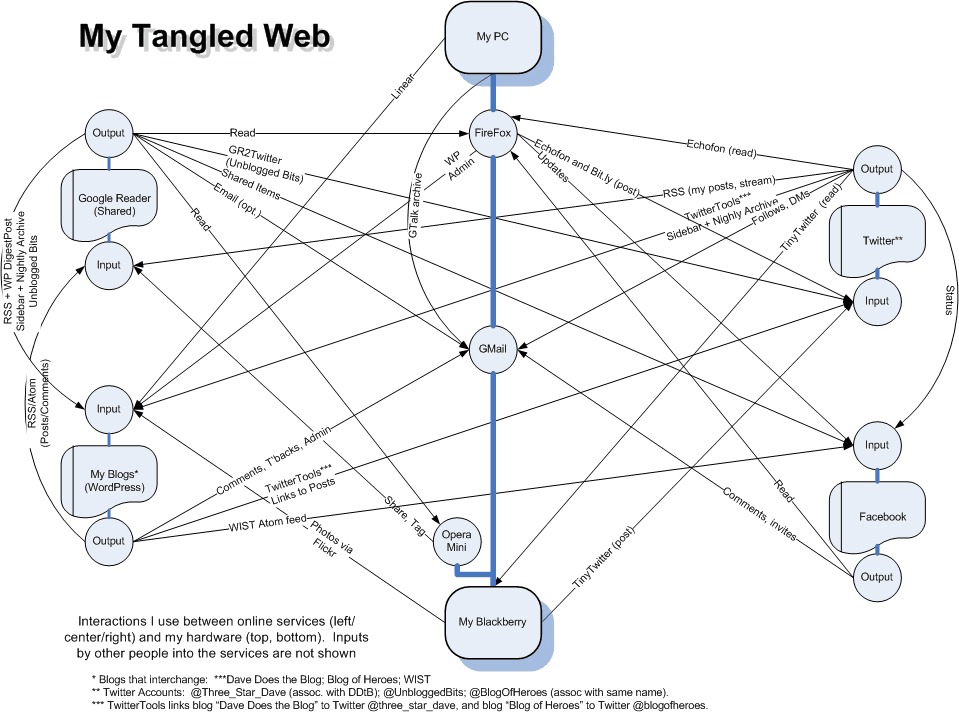
I’ve joked previously about the Vast DDtB Publishing Empire. I finally got around to creating this diagram of it (click for the full size version).

Certain elements are highly abstracted — “My Blogs,” for example. The point was to show the intricate interplay between my PC and Blackberry (and their browsers and GMail) and my blogs, Google Reader, Twitter, and Facebook — most specifically, how doing something on one of them can ripple through several others. This is by design, since I bloody hate cross-posting stuff, but it is something I have to bear in mind whenever I post something somewhere.

The diagram also shows some gaps; Facebook really doesn’t play well with others, for example. Which is one reason I don’t use it a lot, though I know a lot of my readers do.

I’ve listed the tools involved in each of the arrows if not obvious; the function where it is. Details available upon request. Some of the tools involved have changed pretty frequently; if I’d made this drawing only a month ago, some of tools would e quite different.

In the market for a multi-account Twitter client

I already have two Twitter accounts — one for “me” and one for my Blog of Heroes blog. I now have need of a third, as a “professional” presence.

I’ve been using TwitterGadget as my main client (and it’s a great little client), and the actual Twitter web page as the second (which is fine, save that you can’t easily RT), but with a third account, it’s about time to hook into one of those multi-account Twitter clients I hear that all the cool kids have.

Consulting the wisdom of the masses, does anyone have a recommendation. (I can and will take a look at what people who I follow are using, but if someone has a specific recommendation that would likely save time.)

Requirements:

  1. Allows sign-in to multiple Twitter accounts (separate streams).
  2. Small footprint. I don’t need it to wax my car or feed my cat or replicate my Amazon wishlist. I just want basic Twitter capabilities.
  3. I don’t mind paying a modest fee, but, again, I’m looking for a well-done small client, not a lumbering behemoth.

So, any thoughts?

Minor blog housekeeping and credit where credit is due

In the previous Movable Type version of this blog, I had a rotating subheader just under the blog title with various sig-line-like nuggets of wisdom (“To know recursion you must know recursion,” etc.). When I got over into the WordPress world, though, I didn’t see anything that could do that.

What I did find, though, was a plugin called XmasB Quotes (the plugin has nothing to do with Christmas — that’s just the author’s handle). That let me put all those little bon mots into a database and then have them randomly pop up in the blog’s sidebar, where they’ve been under the heading “Witty Repartee.”

Fast forward a few months now, and I know a lot more about WP and PHP than I used to. So I decided to actually poke into the XmasB Quotes documentation — and, sure as shooting, discovered I could use the code …

<?php if(function_exists('xmasb_print_random_quote')) : xmasb_print_random_quote(); endif; ?> 

 … pretty much anywhere I wanted. And since the Thesis theme lets me easily insert stuff into the blog in odd spots without editing the actual underlying template files, as well as turn on/off the WP tagline, and … voilà

So kudos to XmasB for giving me what I was looking for, even when I didn’t know how to make use of it. Not that anyone but a minority of readers who actually come here to comment will ever see it (since I assume most folks get here through an RSS reader). But I’ll see it, and it will make me smile.

Wherein Dave’s data stream becomes still more convoluted

I keep wanting to do a big chart showing how the various things I write and link to flow … but I haven’t quite gotten around to it. If I had, I’d now need to add one more arrow.

I use Google Reader a lot, both to track RSS feeds from many websites and to, in turn, share (often with notes) those feed items that catch my eye. I currently get those shared items (alternately viewable here, or through an Atom feed here) reposted nightly (through the Digest Post WordPress plugin) to this blog as one of the various “Unblogged Bits” posts (for example, here). I do that as a way to save those links and annotations in a more durable fashion.

Of late, of course, everyone’s all about Twitter, going so far as to call RSS dead in the face of the Tweet. Which is like saying that Apples have replaced Steak as America’s favorite food (they’re both good foods, but they serve very different, if superficially related, needs). Still, while I have a Twitter feed (or two) that I use (and publish back to my blog via the Twitter Tools WordPress plugin, for example here), I still felt like there was a disconnect. Should I share something I run across in GReader? Or in Twitter? Or somehow both?

Then I found (through GReader) Reader2Twitter. This is a free service that will route your Google Reader shared items over to Twitter, to amaze and astound your friends (or add some traffic to your Twitter channel, if it’s lacking). Sweet!

Except … I share dozens, sometimes many dozens, of items in GReader. I suspect my Twitter followers (the real ones) wouldn’t appreciate that, esp. as so many of them are already following me on GReader anyway.

So … I created yet another Twitter feed — UnbloggedBits — which is fed by Reader2Twitter from my Google Reader shared items. It even includes truncated versions of the notes I write on many of the shared items (I wish it could put a link to those, rather than truncating them; I may turn that part off). And, of course, there’s available an RSS feed of that Twitter feed of that GReader feed of RSS feeds from other places …

Thus, my burgeoning media empire grows. Or the Internet implodes. We’ll see.

RSS – It’s about time

Hrm.

So I got a note from BD asking why the timestamps on my “Blog of Heroes” comments list in the sidebar is off by 2 hours (i.e., the timestamps show up as +2 hours vs MDT).

That is odd. (And, in fact, it’s true for all the timestamps over there.)

The feeds over there are, as the little icon suggests, RSS feeds. (Back in the MT days I had my blogs creating SSI include files for that purpose, but RSS is much more elegant, to mention much easier). I’m using the KB Advanced RSS Widget to display them, because of the flexibility. It, in turn, uses MagpieRSS to read in and parse the feeds.

Interestingly, you can look at the feeds the blog is reading (if you’re logged into your blog with site admin rights, and are using that plugin) by going to yourblogURL?kbrss=feedURL, e.g.,

https://hill-kleerup.org/blog/?kbrss=https://hill-kleerup.org/blog/heroes/comments/feed/

What’s interesting about it is that this entry:

Comment on CO: We Got Characters! by Dave – 20-Aug-09 12:10pm

Has a publish date (which is the field being used) of:

[pubdate] => Thu, 20 Aug 2009 16:10:50 +0000

Now, my blog is set (verified) to UTC-6, since I’m on Mountain Daylight Time. So you’d think that that would give a date of 10:10:50.

Hmmmm. But my blog’s servers are (I believe) on EDT, which is UTC-4 … which would translate into 12:10 quite nicely.

(As a side note, the feeds only update in the blog once an hour (to keep them from having to update every time the page gets refreshed). So a comment on Blog of Heroes (or, for that matter, a post) will not update here instantaneously.)

I poked around in the widget documentation, and that led me over to the PHP formats for the date. I tested a couple of the time zone parameters — and, hey presto, it showed up as EDT, which makes me think that it’s adjusting the raw feed based on server time zone, not on blog time zone.

I have an inquiry out to the widget developer to confirm my understanding, and to find out if there’s a way around that. In the meantime, I’m including the time zone with the feed listings so that it’s clearer what’s involved. I’m still living in MDT, but my feeds belong to EDT …

Tweet tweet

Ugh. Just realized that my Twitter repeat here on the blog is once again posting in the early hours the next day, no matter what the control panel on Twitter Tools says. Let me tweak it again. Apologies for any date confusion. 

Shilling (willingly) for my host

I have been a happy customer of Hosting Matters for years as my web site host. They are not the cheapest host (nor the most expensive), but I’ve always been impressed by their support. Whenever I’ve had problems, it’s been quick and effective and often beyond what I’d expected. They are good folks, and I’d recommend them to anyone looking for a host.

And, in fact, I am recommending them in the sidebar, with an ad for their new unmetered hosting service. For $10/mo., you get unmetered site capacity (i.e., it’s not measured against arbitrary max limits). So right now I have little infinity signs next to my max disk space, bandwidth transfer, subdomains, mailing lists, etc., for a bit less than I was paying previously for a metered plan.

The unmetered plan is the same as the other hosting plans we offer, and includes space for storage, email, mailing lists, autoresponders, mySQL databases, phpMyAdmin and remote mySQL, the Fantastico autoinstaller functionality (to allow the easy installation of applications to your account), spam filtering, statistics applications, index and error page control: in short, it’s a full-fledged hosting account, with all the tools you need to build or expand your site(s). You also get our 24/7 in-house support, never outsourced, to address any issues or concerns that you may have.

It’s not being called an unlimited plan, because, well (emphasis mine) …

As our existing clients can tell you, we like to be precise about what we’re offering, to ensure our clients have all the information they need to be successful and in control of their sites. While we place no particular limits on the resources that can be used, there is no such thing as (for instance) an unlimited disk drive. Since we prefer to be as plain as possible, we call it unmetered space as it isn’t actively bound by any setting on the server except the total capacity of the server. In addition, we’ve transferred in far too many sites for clients from “unlimited” hosts only to find that there were in fact limits in place, whether explicitly defined or discovered after the fact by the client. We prefer to be much more direct.

[…] The conditions on usage of services here for the unmetered plan are the same as are defined in our Acceptable Use Policy. The most important of these conditions to keep in mind for unmetered clients are the prohibitions against using the space for the purposes of major software repositories or distributions, excessive CPU/memory resource usage may require a change to a dedicated server or alternative that may incur additional fees (you can verify with your referring party that we are quite flexible and reasonable about this [yup -DCH]), and the space cannot be resold to third parties (this is why we have reseller plans available – if you are interested in a reseller package, including transfers of existing reseller packages from other locations, please contact us for options). Of course, there is no spamming permitted from this network, ever.

As someone who has occasionally bumped up against account limits (usually without being aware of it beforehand), it’s nice to know that won’t happen again.

Anyway, I’m not being paid for writing this or for running the ad, but I’m pleased enough by the service I’ve gotten from HM that I’m more than willing to do so. They have my highest recommendation.